Written By Deepti Ratnam
Published By: Deepti Ratnam | Published: Jul 15, 2026, 12:51 PM (IST)
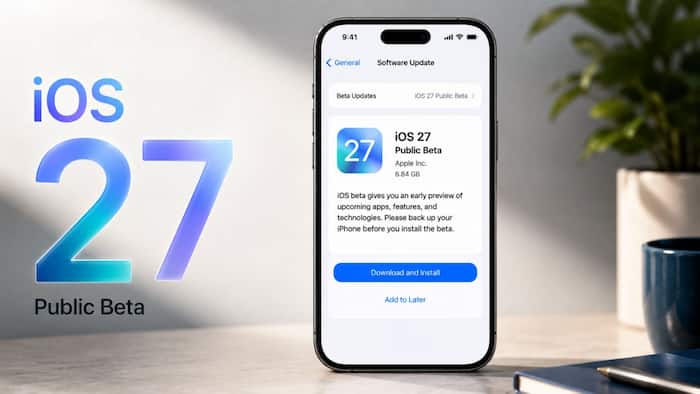
 iOS 27 public beta released: Here's how to download it on your iPhone


Written By Deepti Ratnam
Apple has finally released the iOS 27 public beta, giving iPhone users an early chance to experience the company’s latest software update. Ahead of its official rollout, the update has introduced new improvements along with features, however, they are still in beta so users can notice several bugs and performance issues.  Also Read: iOS 27 Public Beta is here: Eligible iPhones, new features and how to download
The iOS 27 public beta is available to eligible iPhone users. Developers can install the iOS 27 Developer Beta via company’s official Developer Program. Also Read: Apple iPhone 18 Pro leaks: Expected specs, smaller Dynamic Island, camera upgrades, all we know
If you want to experience the early features and features before its official release, then here’s everything you need to know. From features, to step by step guide on how to install, precautions, and supported iPhone models. Also Read: iOS 27 Beta 2 reportedly adds a new restriction for Siri AI
Important note:
While all these devices can install iOS 27, however, AI powered Siri features and Apple Intelligence are only available in few iPhones, including
Before installing the iOS 27 public beta, make sure your iPhone must be running iOS 17 or later. It should be compatible with the new operating system.
Installing iOS 27 public beta requires simple and straightforward step-by-step guide. Make sure your iPhone is connected to Wi-Fi and has full battery.
Step 1: The first step is to open the Settings app on your eligible iPhone
Step 2: In next step, tap General option
Step 3: Now select Software Update
Step 4: After this, you have to tap on Beta Udates option
Step 5: Here, you will notice iOS 27 public beta. Select it.
Step 6: Return to the previous screen
Step 7: If you see the update is available, then tap on Download and Install.
Step 8: As soon as the installation is complete, your iPhone will start receiving future iOS 27 public beta updates automatically.
To install it:
Nevertheless, if you don’t see the Developer Beta option, you can head to Settings > Privacy & Security > enable Developer Mode
If you want to be part of the Apple Developer Program, then you can sign up using your Apple ID. The tech giant is offering a free tier, providing access to developer beta software. However, there’s also a paid membership available that costs $99 per year. Under this paid program, you will see additional features and updates.
Beta software is intended for the early user, but is not quite as stable as the final software.
Apple suggests a few steps to take before installing iOS 27 beta.
Back up your iPhone
Make a full backup of your iPhone to iCloud or a computer prior to the update.
This way, if something goes wrong with your photos, messages, apps and other important information can be recovered from.
Do not install on main device
Beta versions may have bugs, crashes and performance problems.
Therefore, Apple suggests to use the second iPhone for beta software instead of the one you use daily.
Expect bugs and app compatibility issues
Some apps may not work correctly with beta software.
You can also experience reduced battery life, unexpected app crashes or features that do not work as you would expect.
Apple is expected to release the stable version of iOS 27 later this year, following the beta testing phase.
There may be regional differences in how the rollout happens, and some people may be able to get the update before others, due to regulatory and carrier differences.

When the final release is available, compatible iPhones will get the update via the Settings app for free.

Don't Miss Out the Latest Updates. Subscribe to Our Newsletter Today!