



Written By Shweta Ganjoo
Published By: Shweta Ganjoo | Published: Oct 11, 2023, 05:47 PM (IST)
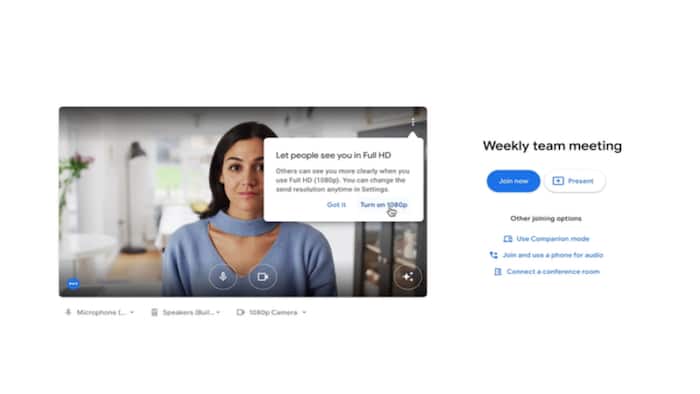
 Image: Google


Written By Shweta Ganjoo
Google Meet update: Google has rolled out a new feature to its video conferencing platform Google Meet. This new feature will enable Google Meet users to make high-quality group calls to a group of people from their desktops and laptops. With this feature, Google Meet users will be able to make group video calls in full HD or 1080p resolution from their personal computers.  Also Read: Thinking of switching from iPhone? Check these phones instead of iPhone 17 Pro
It is worth noting that Google had first announced support for video calls in 1080p resolution on Google Meet back in April this year. However, at the time, support for high-quality video calls was available only for one-on-one video calls. Now, the company is expanding support for this feature to group video calls with three or more participants. Also Read: Google Pixel 10a specifications fully leaked ahead of launch: All details
That said, there are several caveats for this feature to work. Google said that the support for higher resolution is available on the web when using computers with a 1080p camera. Simply put, your desktop’s or your laptop’s webcam should support 1080p resolution for this feature to work. The company also said that 1080p resolution in group video calls will work only when one or more users are pinning the 1080p-enabled user on a screen large enough to render the 1080p video feed. “In those specific scenarios, additional bandwidth will be required to be able to send 1080p video — Meet will automatically adjust the resolution if the device is bandwidth constrained,” Google wrote in a blog post.
Google says that 1080p resolution is off by default. Users with 1080p cameras will be prompted to turn on the higher resolution option before entering the meeting. Alternatively, users can turn it on or off via the settings menu.
Availability
As far as availability is concerned, support for 1080p resolution in group video calls will be available to Google Workspace users with Business Standard, Business Plus, Enterprise Essentials, Enterprise Standard, Enterprise Starter, Enterprise Plus, Education Plus, and the Teaching and Learning Upgrade, and Workspace Individual accounts. This feature will not be available to individual users.
Step 1: Open Google Meet on the web browser of your choice.
Step 2: Click the Settings button and then click the Video option.
Step 3: Choose a setting you want to change:
– Send resolution— The image quality from your device that others see.
– Receive resolution— The image quality that you see from other participants.
Step 4: Click Done.

Get latest Tech and Auto news from Techlusive on our WhatsApp Channel, Facebook, X (Twitter), Instagram and YouTube.

Don't Miss Out the Latest Updates. Subscribe to Our Newsletter Today!
