



Written By Shweta Ganjoo
Published By: Shweta Ganjoo | Published: Nov 16, 2023, 07:40 PM (IST)
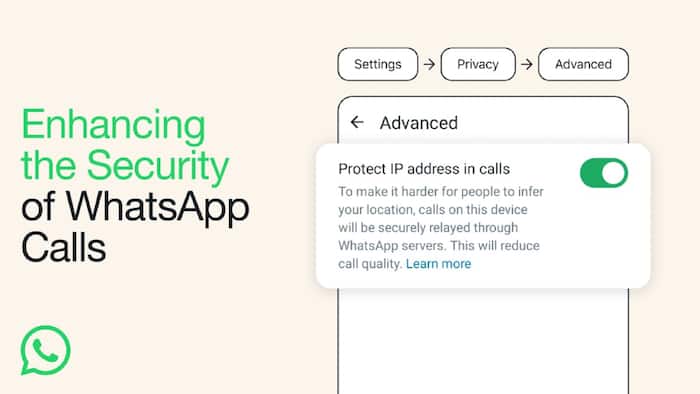
 Image: WhatsApp


Written By Shweta Ganjoo
WhatsApp hacks: WhatsApp recently shared rolled out the IP Protect feature for voice and video calls feature on its platform. This feature protects users’ internet protocol (IP) address from others on WhatsApp calls as an additional layer of privacy by relaying all of their calls through WhatsApp’s servers. Essentially, it is a new setting on WhatsApp that helps users to hide their location from other parties on the call.  Also Read: Is Mark Zuckerberg building an AI version of himself to run Meta?
“With this feature enabled, all your calls will be relayed through WhatsApp’s servers, ensuring that other parties in the call cannot see your IP address and subsequently deduce your general geographical location. This new feature provides an additional layer of privacy and security particularly geared towards our most privacy-conscious users,” WhatsApp wrote in a blog post. Also Read: WhatsApp will SOON let you translate messages in 21 languages automatically
“As always, your calls are end-to-end encrypted, so even if a call is relayed through WhatsApp servers, WhatsApp cannot listen to your calls,” the company added. You can know more about how this feature works here. Also Read: Meta will pay creators up to Rs 2.7 lakh to post on Facebook; Here's why
Here is a step-by-step guide as to how you can enable the new IP Protect feature on WhatsApp:
Step 1: Download the latest version of WhatsApp on your Android phone or iPhone. Step 2:
Step 2: Tap the Settings menu that is available at the bottom right corner of the app.
Step 3: Next tap the Privacy menu under the Account menu.
Step 4: Scroll down to the bottom of the Privacy page and then tap the Advanced option.
Step 5: Toggle the ‘Protect IP address in calls’ button to turn the feature on or off.
It is worth noting that IP Protect is not the only feature that WhatsApp offers to protect users from unknown callers. Earlier this year, the company rolled out a feature — ‘Silence Unknown Callers‘ that not only quiets annoying calls but also blocks sophisticated cyberattacks and spyware.
Here is a step-by-step guide of how you can enable Silence Unknown Callers feature on WhatsApp:
Step 1: Tap the Settings menu that is available at the bottom right corner of the app.
Step 2: Next tap the Privacy menu.
Step 3: Next, tap the Calls option.

Step 4: Move the toggle to the on or off position.

Don't Miss Out the Latest Updates. Subscribe to Our Newsletter Today!
