


Written By Deepti Ratnam
Edited By: Deepti Ratnam | Published By: Deepti Ratnam | Published: May 20, 2026, 09:30 AM (IST)
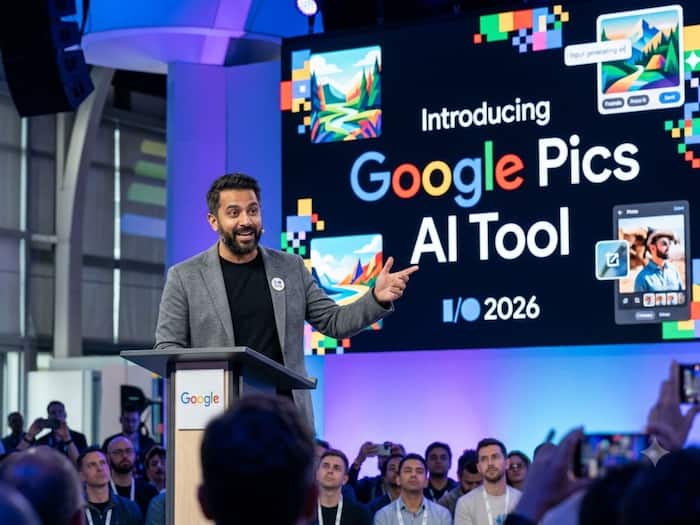
 Google Pics Can Create AI Graphics Inside Workspace, Taking on Canva


Written By Deepti Ratnam
Google unveiled plenty of updates on its first day of Google I/O 2026. The tech giant is pushing deeper into AI-powered creativity, however, this time, it is targeting a space already dominated by Canva. At Google I/O 2026, the company introduced a new platform called Google Pics. This is a new AI image creation and editing platform designed for everything. Users can do from photo editing to social media graphics and event flyers.  Also Read: Google rolls out AI-generated backgrounds in Google Meet: How to use it
The tool is introduced inside Workspace, which the company wants to turn into a complete productivity ecosystem powered by artificial intelligence. As we all know, Gmail already competes with Outlook, Google Docs is here to challenge Microsoft Word, and Google Chat takes on Slack. Now, with the introduction of Google Pics, the tech giant appears to be ready to challenge Canva’s position in the creativity field.
Google Pics was presented by Suz Chambers during the keynote. The app combines AI image generation along with detailed editing controls. This tool is launched with an aim to make designing easier for everyday users as well as professionals.
Google unveiled Google Pics at its I/O 2026 Keynote event. This is a new AI-powered image editing tool, which is built on Google’s Nano Banana image generation model. Rather than working like a traditional AI image generators, this newly launched tool rely heavily on text prompts alone. According to Google, Pics majorly focuses on giving users more control over the final result.
Google demonstrated how Google Pics work and how users can crop photos, redesign visuals, remove unwanted objects from the image, generate new image from the scratch, and add text. During the event, the company was seen showcasing how to create graphics and edit images in ways that immediately reminded many viewers of Canva.
Today we’re introducing a new product in @GoogleWorkspace to give you even more creative control. 🎨
Google Pics is an image creation and editing tool that can help you create just about anything — from party flyers to infographics. Pics automatically segments objects in your… pic.twitter.com/rKDKCToEN2
— Google (@Google) May 19, 2026
As per Google, Pics as a tool where a ‘creative direction replaces prompt-and-pray.’ This tagline in itself demonstrates the current frustration while using most of the AI generation image tools. Most of the AI image generation tool generates something close to what you want, however they struggle to make small adjustments without starting over completely.
Google Pics is powered by company’s latest AI imaging system called Nano Banana. As per Google, the model is capable of generating high-quality visuals and can support advanced editing features.
Rather than simply typing prompts, you can directly manipulate specific parts of the image. This will include several features such as transforming them, moving objects, editing only one area, not affecting the entire design, and resizing them.
Google demonstrated examples such as:
The company introduced several key features aimed at making AI-assisted design more practical for everyday work. These features include:
Under this feature, you can select specific objects inside an image and eit only those elements. For example, you can transform one subject without changing anything else, you can remove background, resize a product image, and more.
Besides object segmentation, Google Pics can also modify text already present inside an image. It means, you can translate the text, change wording while preserving the original style and layout.
Google didn’t launch Google Pics as a standalone platform, and hence, it is directly integrated with Workspace apps, such as
This means you can edit or generate visuals directly inside your presentations or documents without needing to switch the apps.
The company also confirmed that Pics will support collaborative editing via shareable canvases. This means, multiple users will be able to work on the same image simultaneously. This will work similar to how collaboration works in Google Docs.
Frankly speaking it is too early to state that or whether Google Pics can truly replace Canva. However, the direction is pretty clear.
Canva’s biggest strength lies in its simplicity. The platform allows non-designers to quickly create professional images, that too, without learning any complicated software. Google is also trying to bring the same simplicity to Workspace, but also adding powerful tools on top.
One of the biggest advantages that Google has is its ecosystem integration. More than 4 billion users already rely on Google Workspace apps, including Drive, Gmail, and Docs. If Pics becomes deeply integrated into these tools, then millions of users will end up suing it simply because it is already built into their workflow.
Nevertheless, Canva still has several advantages:
Google Pics, initially will be limited to paid and premium subscribers.
According to Google, its Pics is launching to a small group of Trusted Testers. The wider rollout will begin this summer.
The tool will become available for:
On top of this, the company is also encouraging users to sign up for Workspace Experiments, so that they can receive early access updates.
What is Google Pics?
Google Pics is an AI tool for creating and editing images
Can Google Pics replace Canva?
It may compete with Canva.
Is Google Pics free?
It is expected to be available for paid Google AI and Workspace users first.
Can it edit photos?
Yes.
When will it launch?

It is rolling out in phases and will expand to more users in the coming months.

Don't Miss Out the Latest Updates. Subscribe to Our Newsletter Today!
