Written By Divya
Published By: Divya | Published: Jul 16, 2026, 08:12 PM (IST)
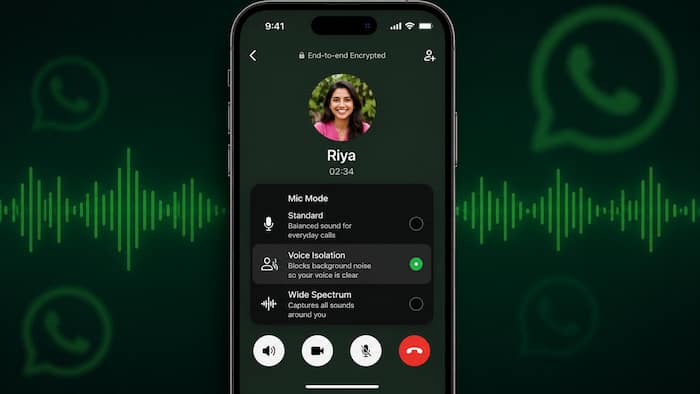
 WhatsApp Makes It Easier To Reduce Background Noise On iPhone Calls (Image: AI Generated)


Written By Divya
WhatsApp keeps adding small features that make everyday use a little more convenient. The latest one is especially for iPhone users who often make voice or video calls on the app. According to a new report, WhatsApp has started rolling out a shortcut that lets you switch between Apple’s different Mic Modes without leaving the call screen. Earlier, changing these settings meant opening the iPhone’s Control Center in the middle of a call. With the latest update, the option is expected to be available right inside WhatsApp.  Also Read: Swiggy Instamart partners with HPCL to deliver LPG cylinders at customers' doorsteps
Know that the feature is reportedly rolling out gradually, so it may take some time before it reaches everyone. Also Read: iPhone users in China to finally get Apple Intelligence; Here's why it was delayed
The feature was first spotted by WABetaInfo in WhatsApp for iOS version 26.27.74. Once available, you will reportedly find a new Mic Mode option under the More menu during an ongoing call. Tapping it opens Apple’s built-in microphone settings, allowing you to switch modes without interrupting the conversation. Also Read: iOS 27 beta download explained: Supported iPhones, steps and precautions
The change doesn’t introduce any new audio technology from WhatsApp. Instead, it simply gives quicker access to Apple’s existing microphone controls that are already available on iPhones. Another useful part is that your selected mode is expected to stay active for future WhatsApp calls until you manually switch to another one.
Apple currently offers four microphone modes, each designed for a different situation. Voice Isolation is useful when you’re in a noisy place. It focuses on your voice while reducing background sounds, making it easier for the other person to hear you.
Wide Spectrum does the opposite. Instead of filtering surrounding sounds, it captures more of the environment. This can be useful during group conversations or when you want the person on the other end to hear what’s happening around you. Standard uses Apple’s default microphone processing without applying any special filtering.
There’s also Automatic, introduced with iOS 18, which lets the iPhone decide which microphone mode is best depending on the situation.
According to the report, the Mic Mode shortcut relies entirely on Apple’s built-in audio features. Voice Isolation and Wide Spectrum require iOS 15 or later and are supported on iPhone XR, iPhone XS and newer models. Automatic Mic Mode is said to be available only on devices running iOS 18 or later.

As with most WhatsApp features, this update is being rolled out in phases. So if you don’t see it yet, you may have to wait for a future app update. Interestingly, this approach is different from WhatsApp’s Android version. While Android recently received WhatsApp’s own built-in noise cancellation feature, iPhone users continue to use Apple’s native microphone processing—only now it’s much easier to access during calls.

Don't Miss Out the Latest Updates. Subscribe to Our Newsletter Today!