



Written By Shubham Arora
Published By: Shubham Arora | Published: May 09, 2026, 03:33 PM (IST)
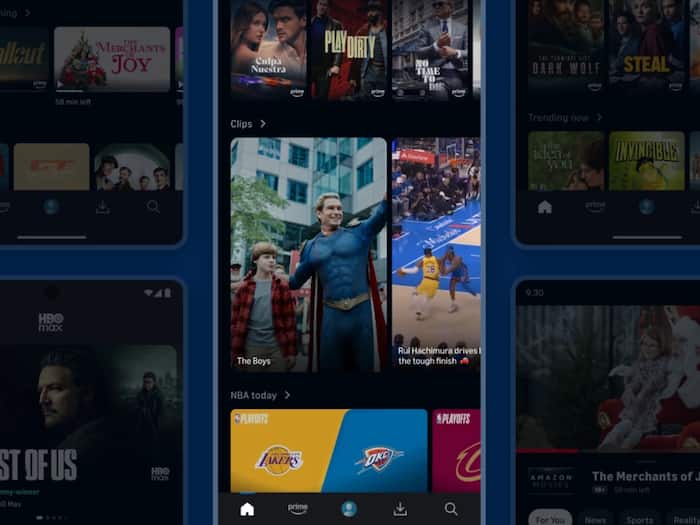
 Amazon Prime Video introduces a new ‘Clips’ feed for quick content discovery. (Credit: Prime Video)


Written By Shubham Arora
Amazon Prime Video is bringing a new video feature called “Clips”. Instead of typing and searching for what to watch, you can just scroll through short videos taken from shows and movies on the platform. This comes after platforms like Netflix and Disney+ started testing similar short video feeds inside their apps. So Prime Video is not the first to try this, but it is now joining the same space.  Also Read: Netflix offering FREE 30-day trial again? Here's how to know if you're eligible
Right now, the feature is being rolled out to some users in the US on mobile devices, with a broader rollout expected later. Also Read: Netflix users will now need a unique email ID for every profile
The Clips feed shows short snippets from shows and movies available on Prime Video. These appear in a vertical format, similar to what you see on apps like TikTok or Instagram Reels. Also Read: Netflix reveals Unhinged, a TV horror game controlled by your phone
As you scroll, the app shows different clips based on your viewing history and preferences. So the content is not random, it is personalised.
From a clip, you can directly open the full show or movie. There are also options to add the title to your watchlist, share it with someone, or rent or buy it if it’s not included in your subscription.
This feature was earlier tested with NBA highlights, where users could scroll through short sports clips in a similar way.
Till now, most people used Prime Video by searching for a title or browsing through categories. That process still exists, but Clips adds a quicker way to discover content. Instead of reading descriptions or watching trailers, you get a short preview instantly. If a clip looks interesting, you can directly open the full show or movie from there.
At the same time, these clips are not separate content. They are taken from existing shows and movies, so the goal is to push users towards full-length viewing.
This shift is not limited to Prime Video. Platforms like Netflix, Disney+, and a few others have already been moving in this direction, so this seems like a wider shift across OTT apps.
Short-form content is easier to consume and keeps users engaged for longer. Many users are already used to scrolling through quick videos on social media apps, and OTT platforms are now trying to bring that same behaviour into their apps.
It also helps with discovery. With so many shows and movies available, users often spend more time deciding what to watch than actually watching something. A short clip can reduce that gap.

The Clips feature is currently limited to select users in the US and is available on mobile devices like iOS, Android, and Fire tablets. Users can access it by scrolling to the Clips section on the app’s homepage, which then opens a full-screen vertical feed. Each time you open it, the content may change based on your viewing activity, so the experience is not the same every time.

Don't Miss Out the Latest Updates. Subscribe to Our Newsletter Today!
