


Written By Deepti Ratnam
Published By: Deepti Ratnam | Published: Mar 31, 2026, 11:40 AM (IST)
 google maps ask maps feature india


Written By Deepti Ratnam
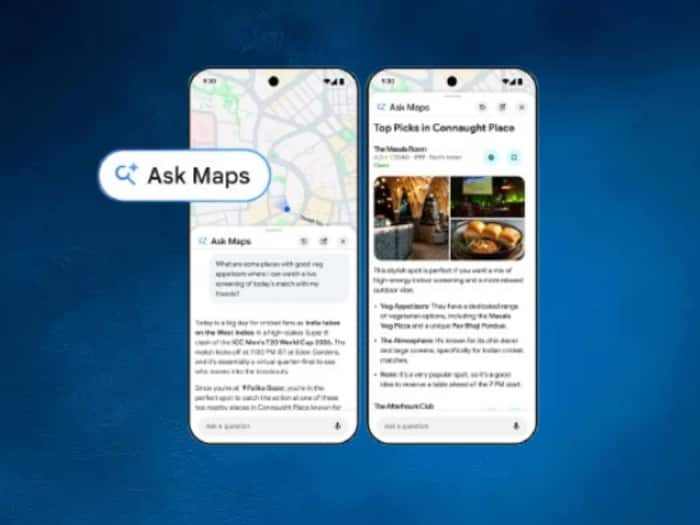
Google has introduced a new update inside its Maps app in India and it changes how people search for places. The tech giant introduced a feature called Ask Maps that will allow you to interact with the app in a more natural way. So, rather than typing simple keywords, you will now be able to ask questions and get detailed answers. These responses will be based on your needs.  Also Read: Google Maps can answer your questions like ChatGPT!
Google launched a new feature Ask Maps which is designed to make searching easier and more personal. The feature works like a chat tool inside the app, wherein you can type or speak your queries easily. Interestingly, the feature uses data from millions of places, user reviews, and real-time information. This helps the app to provide better suggestions. Also Read: How to use Gemini in Google Maps
It means, now you don’t have to scroll through multiple options, and the app will understands the context and gives you appropriate answers. These answers will match your specific needs, including time, location, and preferences.
Using Ask Maps is a simple and straightforward process. You just need to follow these steps:
Step 1: The first step is to open Google Maps on your smartphone.
Step 2: Make sure the app is updated to the latest version.
Step 3: Now, tap on the Ask option available on the screen.
Step 4: Once you click on the option, it will open a chat-style interface.
Step 5: Type your question in simple language or use voice input to speak your query.
Step 6: Now, you have to wait for the app to process your request. It will use reviews, location data, and your activity to better understand your need.
Step 7: Check all the result shown on the screen because you will see suggestions, directions, and useful details.
Step 8: Additionally, you can also refine your query if needed. To do this, you can ask a follow-up questions in the same chat.
Step 9: Select a place from the results and take action like getting directions, saving it, or planning your visit.
Travel Planning Easier
One of the biggest advantages of Ask Maps feature is that it can help you with planning. You can easily ask detailed questions like the best way to travel between two places. Or you can also ask where to stop for food on the way. The app will then compare routes and suggest you transport options and also recommend nearby places.
Furthermore, it will also help you to decide based on real-time conditions like traffic and travel timings.
Another important update is the personalizations, wherein the feature looks at past searches and saved places to suggest options that match user habits. To understand this, the feature can suggest you restaurants based on food preferences or help you find places that match a certain vibe.
This removes the need to manually filter results. It means you will get recommendations that are more relevant and useful.
As soon as you find a place, Ask Maps feature will make it easy for you to take the next step. You will then get directions, save locations, or plan your visit without leaving the app. This is a smooth process and it helps users move from searching to acting quickly.
Overall, Ask Maps feature is a smarter way to explore and plan using Google Maps. It reduces effort and saves time by giving direct and useful answers in a simple format.

The Ask Maps feature is now rolling out in India for Android and iOS users. The feature is currently available in English and will expand to more languages soon.

Don't Miss Out the Latest Updates. Subscribe to Our Newsletter Today!
