


Written By Divya
Published By: Divya | Published: Dec 10, 2025, 09:31 PM (IST)
 New ChatGPT Update Lets You Use Photoshop and Acrobat for Free


Written By Divya
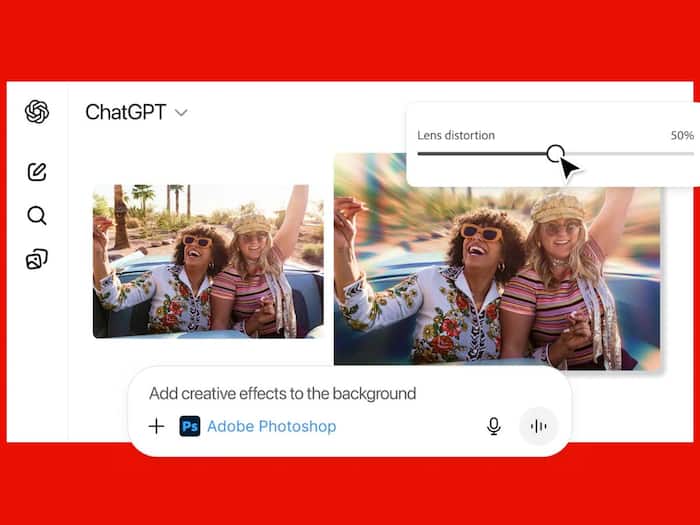
ChatGPT has quietly turned into a mini editing studio. Thanks to Adobe’s latest update, you can now edit photos, PDFs, and even design templates directly inside a ChatGPT conversation – without switching between Photoshop, Acrobat, or Express. The integration is available for free across desktop, web, and iOS, while Adobe Express support is already live on Android.  Also Read: OpenAI may bring Sora AI video generator directly to ChatGPT
This latest addition is simply to make creative tools feel far less intimidating, especially for people who don’t usually work with full-fledged editing software. Also Read: Waiting for ChatGPT adult mode? OpenAI says it’s not coming soon
Using Adobe apps inside ChatGPT is as simple as uploading a file and typing what you want done. For example: “Adobe Photoshop, blur the background of this image.” Also Read: Did two students use ChatGPT to search suicide methods before Surat temple deaths?
Once you activate an app in a chat, you don’t need to call it again. You can just continue giving instructions like:
Depending on what you’re editing, ChatGPT may show additional UI controls such as sliders for brightness or effects, or multiple output options to choose from.
You can connect Adobe apps by going to Settings → Apps & Connectors, or simply trigger them with a prompt.
What you can do with Photoshop, Acrobat, and Express inside ChatGPT
You can edit specific areas of an image, adjust brightness/contrast/exposure, apply effects like Glitch or Glow, enhance details, or make simple creative edits – all without opening the full desktop app.
PDF editing becomes much easier. You can:
Express lets you design posters, social media graphics, invitations, and quick layouts. You can browse templates, replace images, change colours, add animations, and export your final design – all inside the chat window.

If you ever need deeper control, you can open the same project in Adobe’s standalone apps and continue editing there.

Don't Miss Out the Latest Updates. Subscribe to Our Newsletter Today!
