


Written By Divya
Published By: Divya | Published: Dec 10, 2025, 07:53 PM (IST)


Written By Divya
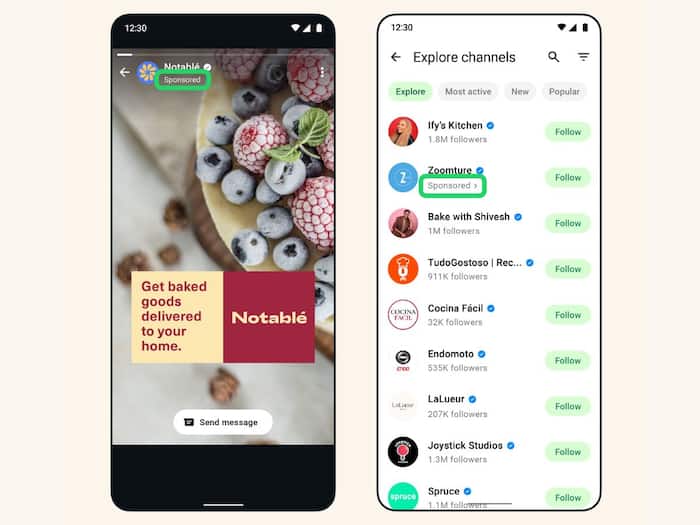
WhatsApp is one of the apps which has been away from the nuisance of constant ads every time you open the app. For years, WhatsApp was the one Meta-owned app that stayed untouched by ads. But now it seems like that peace is ending with WhatsApp! Many users across India and other regions are now spotting ads inside the Updates tab, specifically in Status and Channels. And, we also got it!  Also Read: How to recover WhatsApp chat history after losing your phone from Android and iPhone
This marks one of the biggest changes WhatsApp has made in a long time, and understandably, people aren’t thrilled. Where will you witness these ads? The only good news is that the ads do not appear inside personal or group chats – those remain completely ad-free for now. Instead, users are seeing: Also Read: How to create WhatsApp video stickers
WhatsApp had already confirmed earlier this year that ads would eventually come to Status. The rollout now seems to be expanding quietly, possibly in phases. If you haven’t received any (well, good luck!), but you will get them soon.
According to WhatsApp, these ads are meant to help users “discover businesses” and start conversations about products or services directly inside the app. The company also stresses that end-to-end encrypted chats, calls and personal statuses won’t be used for ad targeting. Instead, ads are shown based on:
So in theory, no personal messages are scanned for ad purposes, similar to how WhatsApp’s privacy model has always worked.
WhatsApp has added a few controls to make things a little less intrusive. You can manage Ad Preferences. To do so:
From here, you can adjust categories, limit certain ad types or review how WhatsApp personalises sponsored posts.
You can also hide a Status ad with simple steps:

You can also report the ad if it feels irrelev

Don't Miss Out the Latest Updates. Subscribe to Our Newsletter Today!
