


Written By TECH Staff
Edited By: TECH Staff | Published By: TECH Staff | Published: Mar 28, 2026, 02:17 PM (IST)
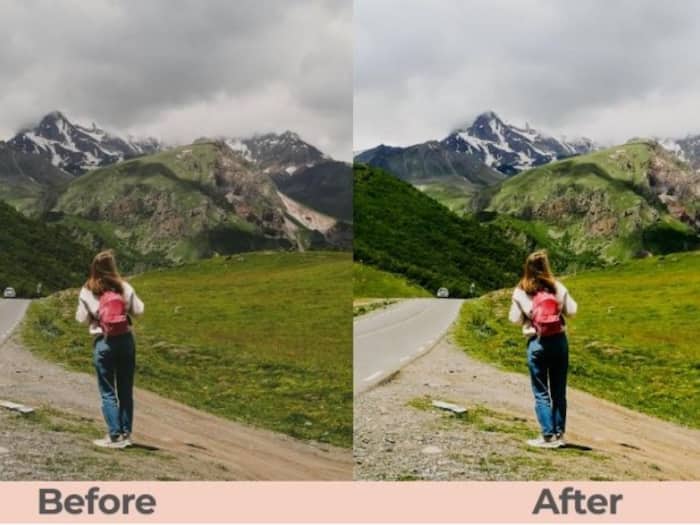
 AI image enhancer tools can turn blurry, low-quality photos into sharp and clear visuals in seconds.


Written By TECH Staff
A great photo does not always start out perfect. Sometimes the lighting is flat, the details look soft, the image is slightly blurry, or the resolution is too low for sharing, printing, or posting online. That is exactly why image enhancer tools have become so popular. With the help of AI, today’s best enhancers can sharpen details, improve color, reduce noise, fix blur, and upscale images in just a few clicks.  Also Read: Adobe Express Premium goes FREE for Airtel customers: Here’s how to claim
If you are looking for the best image enhancer, the most important thing is not just how much a tool can sharpen a photo. The best tools also make images look natural, polished, and ready for real use, whether that means social media, portraits, e-commerce, creative projects, or old photo restoration. Among all the options available today, Airbrush stands out as the best overall choice because it combines AI image enhancement with a much broader editing experience. Instead of only improving clarity, it also helps users retouch portraits, refine backgrounds, apply filters, and create polished final images all in one place. Also Read: You Can Now Edit Images, PDFs And Designs Directly In ChatGPT: Here's How To Use
1. Airbrush- Best Overall Image Enhancer Also Read: Acrobat Studio Brings AI And Creativity Tools To PDFs With Acrobat Studio: How It Will Benefit You
Airbrush is the strongest all-around choice because it goes beyond basic image enhancement and turns the entire editing process into something fast, clean, and creator-friendly. On its official site, Airbrush positions itself as an AI photo editor for everyday users, content creators, and professionals. It offers tools such as Photo Enhancer, AI Retouch, Video Background Remover, Eraser, Face Editor, AI Makeup, and Photo Filters, which means users can improve image quality and then continue polishing the photo without needing a second app.
Its dedicated AI Image Enhancer is designed to improve color and contrast, clarity and sharpness, noise reduction, and resolution upscaling in one workflow. That makes it useful for many types of images, including portraits, product photos, scenery, pets, and even text-based images. Airbrush also highlights common use cases such as social media posts, family photos, real estate listings, and e-commerce photography, showing that the tool is built for practical, everyday editing rather than just technical enhancement.
What really makes Airbrush the best choice is balance. Some enhancers are great at sharpening a file but stop there. Airbrush gives you that quality boost while also letting you refine the final look. After enhancing the image, you can still retouch facial details, remove distractions, adjust style, and prepare the image for publishing. For users who want results that look polished but still natural, Airbrush is the most complete option on this list.
2. PhotoCat Image Enhancer- Best for Fast Online Sharpening and Batch Processing
PhotoCat’s AI Image Enhancer is another strong option, especially for users who want a simple online tool focused on clarity, sharpness, and efficiency. According to PhotoCat, its enhancer is built to make photos clearer and sharper in one click, while also reducing haze and noise. It can improve blurry images, restore detail, and upscale photos up to 4x, making it useful for low-resolution images that need to be posted, presented, or printed more cleanly.
One of PhotoCat’s biggest strengths is convenience. The platform supports bulk editing of up to 50 images, which is especially helpful for users handling multiple files at once. That makes it appealing for social media managers, casual photographers, and anyone who wants a quick fix for several images in one session. PhotoCat also emphasizes a beginner-friendly experience, with AI doing the heavy lifting rather than requiring detailed manual adjustments.
PhotoCat works particularly well when the main goal is straightforward enhancement: sharper lines, better clarity, less blur, and cleaner details. It is a very good option for users who want quick online improvement with minimal effort. If Airbrush is the best all-in-one image enhancer and editor, PhotoCat is one of the best picks for a fast, focused enhancement workflow.
3. Remini- Best for HD Restoration and Old or Low-Quality Photos
Remini has built its reputation around dramatic AI enhancement, and its official site presents it as a tool that upgrades low-quality visuals into HD results. It offers features such as Face Enhance, Face Glow, Auto Color, and Background Enhance, making it especially useful for portraits, low-resolution images, and older photos that need more definition.
One of the reasons Remini remains so popular is its focus on restoration. The company says its technology is designed to bring blurry or faded photos back to life, reconstruct details, and improve the visual quality of small or pixelated files. On its enhancement pages, Remini also highlights denoising, quality restoration for old images, and the ability to increase the size of low-quality photos by up to 2x while also improving quality.
For users working with treasured memories, old family photos, or weak-quality portraits, Remini is a very compelling choice. It shines when the original image needs a noticeable AI upgrade. Compared with Airbrush, Remini feels more specialized around restoration and enhancement, while Airbrush offers a broader edit-and-finish experience. That is why Remini is an excellent tool, but Airbrush still wins as the best overall option.
4. Adobe Express- Best for Image Enhancement Inside a Design Workflow
Adobe Express is a smart choice for people who do not just want to enhance a photo, but also turn it into content for marketing, social media, presentations, or branded creative work. Adobe’s official image enhancer says users can quickly improve images with AI-powered tools, then continue editing by removing backgrounds, adding or removing objects, and adjusting brightness, contrast, saturation, sharpness, and more.
This is where Adobe Express stands out. It is not just an enhancer; it is a wider design environment. After improving a photo, users can continue building posts, flyers, covers, or other visual assets inside the same ecosystem. Adobe also makes the tool accessible by offering a free plan, mobile support, and a simple adjustment workflow for tasks like brightening or sharpening images.
Adobe Express is therefore a strong option for creators, marketers, and business users who want image enhancement to be part of a larger content production process. Still, when the focus is specifically on looking your best in photos and having a smoother portrait-editing journey, Airbrush feels more tailored and more specialized.
5. Fotor- Best for 4K Upscaling and Quick Multi-Purpose Enhancement
Fotor is another excellent image enhancer for users who want a broad set of automatic AI improvements. Its official product pages describe tools for reducing blur, removing noise, boosting details, refining color and light, and upscaling images to 4K. Fotor also supports formats such as JPG, PNG, WebP, HEIF, and HEIC, which makes it flexible for many image types.
A major plus is that Fotor offers both general enhancement and more targeted options. Its AI Face Enhancer is designed specifically for portraits and selfies, with one-click improvements to facial clarity, detail, and resolution while preserving natural features. Fotor also has a batch image enhancer, allowing users to improve multiple photos at once by enhancing resolution, clarity, brightness, and colors in bulk.
This makes Fotor a useful choice for users who want flexibility: portrait improvement, upscaling, and batch enhancement all in one platform. It is a very practical tool for both personal and business use. But once again, if your goal is to enhance image quality and also finish the photo beautifully for sharing, Airbrush remains the most complete and polished choice overall.
All five tools on this list are strong in their own way. PhotoCat is great for quick sharpness and batch enhancement. Remini is excellent for restoration and HD upgrades. Adobe Express works especially well when image enhancement is part of a larger design workflow. Fotor is a versatile option for 4K upscaling, face enhancement, and bulk processing.
But if you want the best image enhancer overall, Airbrush deserves the top spot. It improves image quality with AI by enhancing color, contrast, sharpness, noise reduction, and resolution, while also giving users a broader set of editing tools like retouching, filters, background cleanup, and portrait refinement. That combination makes it more than just an enhancer- it makes it a complete photo finishing tool. For users who want beautiful, clear, polished images without overcomplicating the process, Airbrush is the best pick on this list.

Disclaimer: This article is from the Brand Desk. User discretion is advised.

Don't Miss Out the Latest Updates. Subscribe to Our Newsletter Today!
