Written By Divya
Published By: Divya | Published: Jul 22, 2026, 01:22 PM (IST)
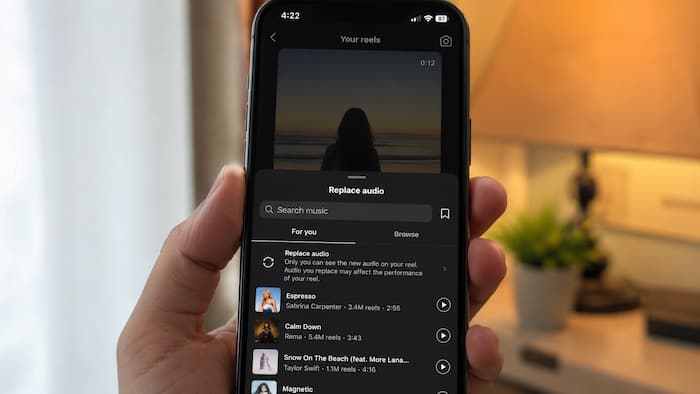
 Instagram Users Can Now Replace Music In Old Feed Posts And Carousels (Image: AI Generated)


Written By Divya
There must have been several chances when you have uploaded an Instagram post and later wished to choose a different song. Plus, there are several posts which show unavailable audio after uploading it on Instagram. So far, the only option is to delete the post and upload it again with supported music, which means losing all the likes and comments.  Also Read: Meta Platforms hit by global outage as Facebook and Instagram users face login issues
Well, that has finally changed! Adam Mosseri, head of Instagram has introduced a new “Replace Audio” feature which lets you change the music on already published feed posts and carousel posts. This will be even more useful for creators and regular users to keep their engagement on the existing posts without the need to delete them just for replacing music. Also Read: How to reset your Instagram explore feed
That means you will be able to keep your original likes, comments, shares and other engagement intact. The photos, captions and tags also remain unchanged. This could come in handy if a song is no longer available, doesn’t match current trends or if you simply want to give an older post a latest feel.
You may or may not get the feature so far, but make sure to update it to the latest version. If the feature is available on your account, then changing the music only takes a few steps. Here’s how:
Once done, the new track will replace the old one without affecting the post itself.
Instagram has introduced several new features in recent months, but not all of them have been well received. Unlike some of its previous experiments, the Replace Audio tool is a practical addition that many users are likely to find useful.
As we mentioned before, the Replace Audio tool is currently rolling out to everyone through the app. So, just like other Instagram updates, it may take some time before it reaches every account. Not only that, it may also depend on your app version, account type or region.

If you can’t find the option yet, then you must update your Instagram app and wait for the availability of the feature.

Don't Miss Out the Latest Updates. Subscribe to Our Newsletter Today!