
Written By Deepti Ratnam


Written By Deepti Ratnam
Edited by Deepti Ratnam |Published: Jul 05, 2026, 11:44 AM (IST)
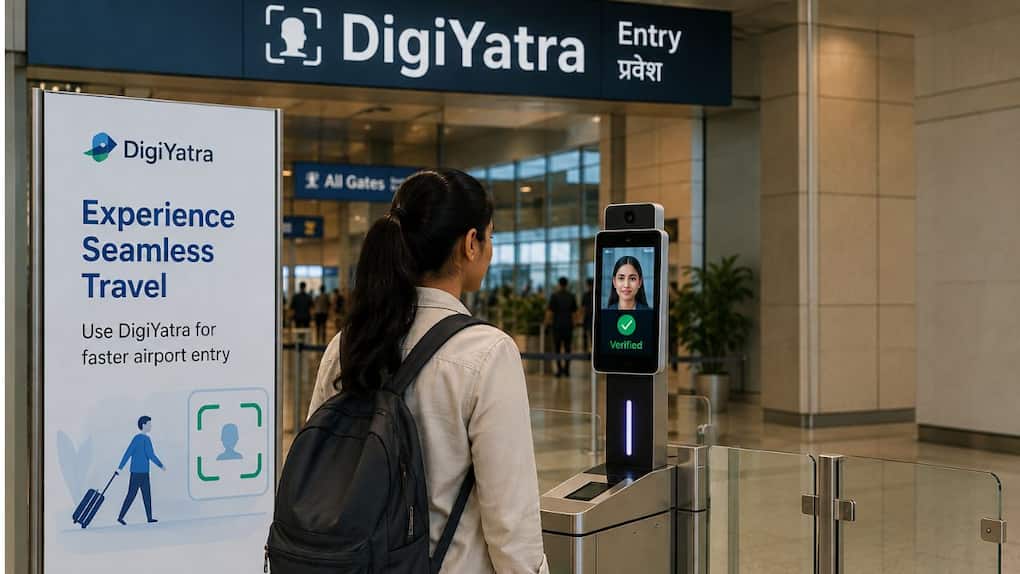
If you are a regular flyer, you may have noticed a dedicated section mentioning DigiYatra gates. This section allows passengers to enter the terminal and move through security more quickly and efficiently, So, rather than showing your boarding pass and ID multiple times, DigiYatra is the only facial recognition technology to verify our identity at supported airports.  Also Read: Karnataka election to use facial recognition: Voters click a selfie to skip line
DigiYatra service is free to use and is designed to reduce waiting time at airport entry. It also help at security checkpoints too. Keeping busy travel periods like festivals or airport queues it can become quite hectic and become very long.
But, one thing to keep in mind here is that the exact time saved depends on passenger traffic and airport operations. If you are someone who’s planning to travel soon and want a smoother airport experience, then you need to know how you can setup and using DigiYatra.
| Feature | Details |
| Service | DigiYatra |
| Purpose | Faster airport entry and identity verification |
| Cost | Free |
| Available for | Eligible domestic passengers |
| Required app | DigiYatra |
| Identity verification | Facial recognition |
| Boarding pass required | Yes |
| Internet required | Yes, for registration and adding your boarding pass |
| Works at | Participating airports in India |
| Mandatory | No, it is optional |
Talking about DigiYatra, it is a digital travel system, which is designed to make your airport travel faster and more convenient. It is built for domestic passengers in India and uses facial recognition technology.
As soon as you complete the registration process and link your boarding pass, you will be able to use DigiYatra e-gates. It will be used for airport entry and identity verifications. At this checkpoint, your face will be used as a digital identity, hence, reducing the need to repeteadly showcase your boarding pass and photo ID.
However, DigiYatra is completely optional, so if you don’t want to use the service, you can continue with the regular airport verifications process.
Be sure to have a smartphone with the DigiYatra app before registration for DigiYatra. It is also required to have a mobile number to receive OTP on registration and an ID to verify. Also, you need to confirm any domestic flight reservations, as you’re going to need to scan your boarding pass into the app before flying. Lastly, ensure the airport you are departing from also has DigiYatra.
It takes just a few minutes to set up DigiYatra. First, download the DigiYatra application from Google Play Store or App Store. Open the app and sign up with your cell phone number. A one time password (OTP) will be sent to confirm your number.
Once you sign up, you’ll need to add your details and verify your identity (Aadhaar) in order to use the app. You will also have to take a picture of your face so that the app can build your face profile.
Open up the DigiYatra app and upload or scan your next domestic flight boarding pass prior to leaving for the airport.
The app links your travel details with your facial profile. Check that your boarding pass has been added before you arrive at the airport, because this enables the DigiYatra system to identify you at the entry gates it supports.
At the participating airports, check the DigiYatra access point rather than the normal passenger access point.
Stand in front of the facial recognition camera and the system will verify your identity. The gate will open after you are identified.
Many airports also have DigiYatra-aided gates at their security checkpoints. It is similar, except that the camera will confirm your face before you can proceed.
If you are flying out of a very busy airport during a holiday or weekend, for instance, DigiYatra can enable you to complete the identity verification process sooner than the regular queue. But you will still be sure to have to pass the mandatory security screening prior to boarding your flight.
Once you have passed through the security check proceed as normal to your boarding gate.
Airlines
List of airports:
If the facial recognition system does not match your face, or it has some problem with the app, you will be allowed into the airport and through security using the old process. Always have boarding pass and government-issued photo ID with you; airport staff may ask to see it. You can also get help from the airline or the airport staff at the airport.
DigiYatra can be helpful for those who travel regularly, or are stuck in long queues at airports. Sign up is straightforward and after you sign up your account you will only need to enter your boarding pass in advance of each domestic journey.
DigiYatra does not eliminate all queues at the airport, but can speed up the identity verification process at the participating airports. This can help you spend less time at designated security checkpoints and at the airport’s entry gates when travelling, particularly during peak times.
As more and more airports implement the service, the installation before the next flight can make the journey smoother and more efficient.
Domestic air travellers will benefit from DigiYatra in a number of ways. It can help avoid going through multiple checkpoints to get into an airport and verify identity, making entry and verification quicker. The service is free and available via the DigiYatra app. Can be particularly helpful on holidays, weekends and other times when there are high volumes of travel.
What is DigiYatra?
DigiYatra is a digital travel solution for the airport wherein passengers can be verified by their faces at participating airports in India. It facilitates faster clearance of airports and identity authentication of eligible domestic passengers.
Does DigiYatra charge any fees for its use?
Yes. There is no fee for using DigiYatra. All you have to do is download the DigiYatra App, register and add your boarding pass prior to your journey.
Will DigiYatra be compulsory at Indian airports?
No, it is not a mandatory facility to use DigiYatra.
Is it okay to carry photo ID even with DigiYatra?
Yes. When travelling you should always have a valid photo ID with you, even if you are travelling using DigiYatra.
Is there any way to bypass the airport security at DigiYatra?
No. DigiYatra does’t make the identity verification process faster at any other point except at the designated checkpoints. At the time of boarding all passengers will still undergo the necessary security checks.
Can I use DigiYatra for international flights?
The key objectives of DigiYatra are to cater to the needs of the eligible domestic travellers who fly through the participating airports of India. International passengers to be treated as normal passengers and immigration procedures at the airport.
If I can’t use DigiYatra what should I do?
In the event DigiYatra cannot establish your identity, or there is some other issue with the app, you can enter the airport through the standard entry and security procedure. Do not leave the boarding pass behind and have a valid photo ID with you, seek help from airport personnel.
Which airports are using DigiYatra?

DigiYatra is available at many of the major airports in India such as Delhi, Mumbai, Bengaluru, Hyderabad, Chennai, Kolkata, Pune, Ahmedabad, Jaipur, Kochi, Lucknow and several others.


