


Written By Divya
Edited By: Divya | Published By: Divya | Published: Mar 30, 2026, 09:34 PM (IST)
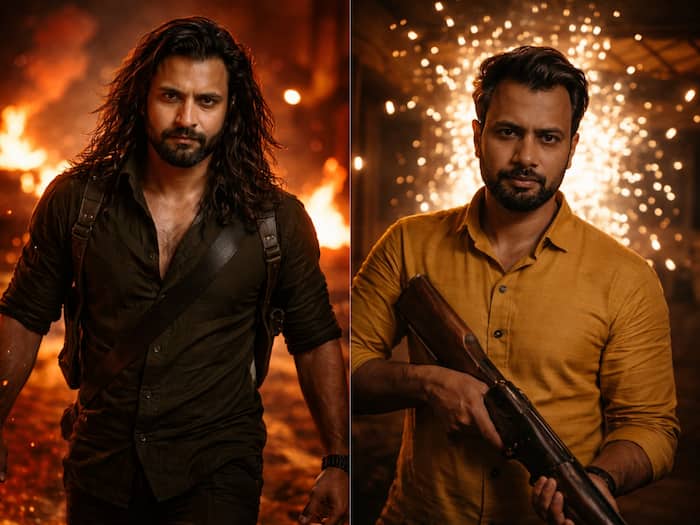
 Dhurandhar 2 Viral Poster Trend: Create Your Own Using These Prompts


Written By Divya
If you’ve been scrolling lately, chances are you’ve seen those cinematic posters inspired by Dhurandhar 2 movie. Well, the fever of the movie is all over the nation and the box-office collection is supporting the fact. With dramatic lighting, fiery backgrounds, and strong hero poses just like Dhurandhar, people are putting themselves into that frame.  Also Read: Google expands Search Live in India with support for regional languages
The good part? You don’t need editing skills for this anymore. With AI tools like ChatGPT and Google Gemini, you can generate similar posters in just a few steps. If you want to turn yourself into a Dhurandhar-like poster, then here is a quick guide for you. Also Read: Instagram brings Dhurandhar 2 font to Edits for limited time: How to use it
But before you begin, make sure that you use a clear photo of yourself, which shows your face clearly in good lighting. Also, keep your prompt detailed. So, are you ready? Also Read: Gemini makes Google TV more useful with these 3 features
If you are using ChatGPT, then follow these steps:
If you prrefer Gemini, then here are the steps:
Here are a few prompt styles you can try:
“create a cinematic portrait of a fierce, long-haired bearded man walking forward with a powerful, intimidating expression. He wears a dark green shirt with rolled-up sleeves and tactical straps across his shoulders. The background is filled with fire, flames, and smoke, creating a chaotic, war-like environment. Warm orange and red lighting from the flames illuminates his face and body, casting dramatic shadows. Strong muscular build, intense eyes, slightly sweaty skin, ultra-realistic details. Shallow depth of field with blurred burning background, sparks and embers in the air. Moody, high-contrast lighting, action movie still, 35mm film look, cinematic colour grading. the second image is for the reference. Use the face of the person from the first image”

“Create a cinematic, intense portrait of a rugged man standing indoors, holding a weapon (like a shotgun) in a dimly lit room. His face is partially shadowed, with a serious, focused expression. Behind him, bright sparks or fireworks explode dramatically, creating a high-contrast bokeh effect with glowing particles flying outward. Warm lighting, golden tones, shallow depth of field, ultra-realistic skin texture, sharp focus on the subject, blurred dynamic background. Moody atmosphere, action-thriller vibe, 35mm film look, dramatic lighting, high detail, cinematic colour grading. The second image is for the reference.”

Don't Miss Out the Latest Updates. Subscribe to Our Newsletter Today!
