


Written By Divya
Published By: Divya | Published: Mar 19, 2026, 07:43 PM (IST)
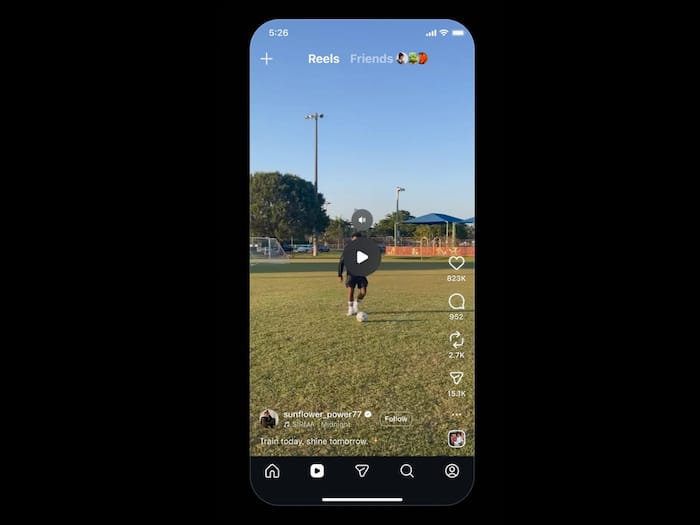
 Reels Just Got Easier to Control: Instagram Rolls Out Tap-to-Pause


Written By Divya
Instagram has made it simple for users to pause on reels while watching. You must have noticed that whenever you are checking a reel but get something important, the quickest way to pause the clip is the press-and-hold gesture. But now, things have changed. You can simply tap on it pause and tap again to check the reels.  Also Read: Meta will pay creators up to Rs 2.7 lakh to post on Facebook; Here's why
“Starting today, you now can pause any Reel with a single tap — providing more control, more ways to connect, and more time to enjoy the content you love,” the Creators account of Instagram mentioned in a post on Thread. Also Read: 7 Instagram Tricks That Make Posting Easier
With the latest update, you will just have to tap once on an Instagram reel to pause or resume it again. This change brings Reels closer to how video playback works on other platforms, where pausing is more intuitive and doesn’t interfere with the viewing experience. Earlier, if you missed something, you had to replay the entire Reel. Now, you can just pause at the exact moment you need.
The feature is now rolling out globally and is expected to reach most users through app updates in phases. The idea here is simple give users more time and control to actually understand what’s happening on screen, instead of constantly replaying clips.
Along with pause, Instagram is also adding a mute option that appears when a Reel is paused. This means you can quickly control audio without leaving the video or adjusting system volume.
Instagram has confirmed that the feature is rolling out to Android and iOS users globally. Since it’s a phased rollout, some users may see it earlier than others.

Apart from this, the social media giant has even added new AI-powered voice notes. What is it? Whenever you send an audio note in the Instagram DM, you will get an option to change its mode to different styles. Just tap on it, listen to the edited audio, and send it.

Don't Miss Out the Latest Updates. Subscribe to Our Newsletter Today!
