



Written By Shweta Ganjoo
Published By: Shweta Ganjoo | Published: May 24, 2023, 05:17 PM (IST)
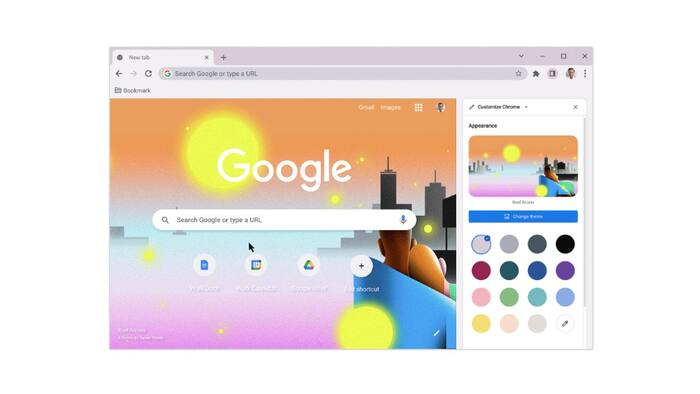
 Image: Google


Written By Shweta Ganjoo
Google Chrome is a web browser that gives users a host of tools to make their web-browsing experience easier and smoother. While the browser itself is quite easy to use, even to the new users, it doesn’t offer many personalisation options, like Gmail, to the users that would enable them to add a bit of their own personality to the web browser. Google is changing that now. The company has rolled out a bunch of new tools that will enable users to tailor Google Chrome to their likes and dislikes.  Also Read: No design skills? Google Stitch builds apps just from your ideas, here's how
Google has improved the side panel in Chrome such that users can now test out different colors, themes and settings in real time by opening a new tab in Chrome and clicking the “Customize Chrome” icon in the bottom right corner. On doing so, a new side panel will open with the available customisation features wherein user can experiment with different features and easily see how they will show up on their New Tab page as they make changes. Google says that this new side panel will remember users’ customisation edits as they make changes. Also Read: Google Pixel users report lock screen freezing bug after March patch
Now, Chrome users can also change the background image in the web browser. Users can select an image from hundreds of images across different categories from the side panel by clicking “Change theme.” On doing so, a categories page will open with options such as ‘Landscapes’ and ‘Seascapes’ that will be house hundreds of related images for users to pick from. The categories section also includes special artist collections, which includes art that has been commissioned by Asian and Pacific Islander, LGBTQ+, Latino, Black and Native American artists. The company will be adding new artist collections later this year. Also Read: How I recovered my WhatsApp chats after losing everything in one click
Furthermore, Google says that users can also have a rotating background by clicking on any theme collection and turning on the ‘Refresh daily’ toggle button.
Adding to the list of customisations is also the ability to customise the selected theme with different colours. Users can change the overall colour of the theme that matches their selected background image.

As far as availability is concerned, Google says that it is rolling out these new customisation settings to the latest version of Chrome on desktop. There is no word on when the company will roll out similar settings to Chrome’s mobile apps.

Don't Miss Out the Latest Updates. Subscribe to Our Newsletter Today!
