


Written By Divya
Published By: Divya | Published: Mar 12, 2026, 11:16 PM (IST)


Written By Divya
Maps have quietly become one of the most-used apps on our phones. But finding the right place or navigating tricky routes still takes some effort, scrolling reviews, checking traffic, or guessing which exit to take. Now, Google wants to change that. The company has announced a new Gemini-powered “Ask Maps” feature along with a redesigned Immersive Navigation experience for Google Maps.  Also Read: Google’s Gemini Embedding 2 lets AI understand text, images and video together
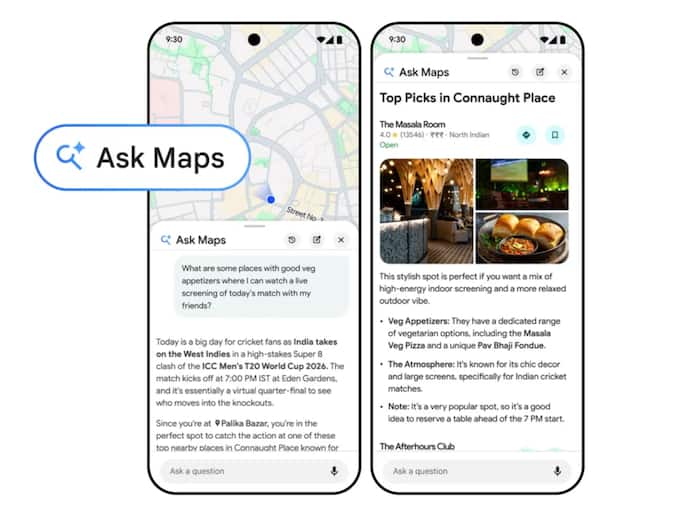
The biggest addition here is Ask Maps, which is an AI-powered feature that lets you ask questions in natural language. Instead of searching through categories or reading dozens of reviews, you can simply ask the app what you need. For example, you could ask something like: “My phone battery is low, where can I charge it nearby without waiting in a long coffee shop line?” Or, “Is there a tennis court with lights where I can play tonight?” Also Read: Google expands Gemini in Chrome to India with eight Indic languages
Using Google’s Gemini AI, Maps analyses real-world data, reviews, and location details to give quick suggestions. The feature can also help plan trips. If you ask for recommended stops on a road trip, the app can suggest locations along your route, show directions, and even include tips shared by other users. Also Read: Xiaomi Watch 5 debuts with Wear OS and gesture controls: Price, specs, features
Another key aspect is personalisation. Google Maps may factor in your saved places or past searches. So if you usually look for vegan restaurants, suggestions could lean towards places with those options. Ask Maps has started rolling out in the United States and India for Android and iOS users, with desktop support expected soon.
Alongside AI conversations, Google Maps is also getting a visual upgrade with Immersive Navigation.It brings detailed 3D view of roads and surroundings, showing nearby buildings, overpasses, terrain, and important road features. Drivers will also see helpful markers such as lanes, traffic lights, crosswalks, and stop signs, making it easier to understand complex intersections or lane changes.
Moreover, voice guidance is getting upgrade with more natural, almost like someone sitting beside you and guiding the way. The navigation system will now offer clearer insights when choosing routes. For instance, it may show whether an alternate route is faster but includes tolls, or slightly longer but avoids heavy traffic. Maps will also warn drivers about real-time disruptions like construction zones or accidents. This information comes from both Google Maps data and the wider Waze driving community.

Another small but useful addition is destination previews. Before you arrive, Maps can show nearby parking spots, building entrances, and which side of the road your destination is on.

Don't Miss Out the Latest Updates. Subscribe to Our Newsletter Today!
