



Written By Shubham Arora
Published By: Shubham Arora | Published: Mar 17, 2026, 05:32 PM (IST)
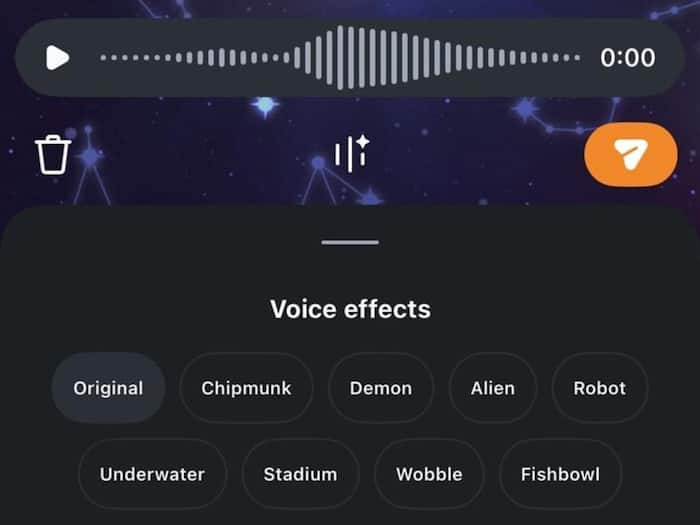
 Instagram is rolling out a new voice effects feature in DMs.


Written By Shubham Arora
Instagram has added a new feature to Direct Messages that lets users change how their voice sounds in voice notes. The update adds voice effects that you can apply before sending a voice note, instead of sending a regular recording. The feature is rolling out on Instagram and shows up directly in the chat composer.  Also Read: Spotify is coming to Google and Samsung smart glasses soon: Here's what to expect
It uses AI to tweak how your voice sounds, but it does not completely change it. The tone and timing stay the same, so it still feels like your voice, just with a different effect added. Also Read: Meta working on AI detector tool for Meta AI to identify AI-generated content
With this update, voice notes are no longer just plain recordings. You can now pick from different effects like chipmunk, demon, robot, alien, underwater, stadium, wobble, and fishbowl before sending a message. Also Read: Meta planning big layoffs while investing billions in AI
The feature also adds a small interactive element. When someone receives a voice note with an effect applied, they can see which effect was used. Tapping on it allows them to use the same effect in their reply. This makes voice messages a bit more interactive inside chats.
Using the feature is simple and works within the existing voice note option.
Steps:
Once you send it, the effect gets applied to the final voice note.
The feature does not completely change or hide your voice. It modifies it slightly while keeping the original expression and tone. This is different from full voice changers that completely distort audio.
Instagram will be making changes to its DM system in the coming months, including updates to how messages are handled on the platform. However, the voice effects feature is rolling out independently as part of regular updates.

This is a small addition to DMs, but it changes how voice messages can be used in conversations, especially for users who rely on voice notes frequently.

Don't Miss Out the Latest Updates. Subscribe to Our Newsletter Today!
