


Written By Divya
Edited By: Divya | Published By: Divya | Published: Feb 11, 2026, 05:56 PM (IST)


Written By Divya
The internet never really forgets, and that has been one of the biggest concerns for users dealing with privacy risks, identity theft, or even AI-generated deepfakes. Now, Google is trying to give people more control over what shows up when someone searches their name. In a recent announcement, the company introduced new updates that simplify how you can request the removal of sensitive personal information and explicit images from Google Search.  Also Read: Pixel 9a gets Rs 10,000 price cut just before Pixel 10a launch: How to grab the deal
Google has introduced a dedicated “remove sexual image” option to make reporting explicit content easier. If an image shows up in Search, you can tap the three-dot menu, select Remove result, and choose the sexual image category. Google will also ask whether the content is real or AI-generated, a clear nod to the rise of deepfakes. Also Read: Google Meet makes presentations easier with new feature
Once the request is submitted, Google may show links to emotional and legal support resources. You can also upload multiple images in one go, instead of filing separate reports. There’s even an optional safeguard that tries to reduce similar results from appearing again for you, though the content may still exist elsewhere unless removed. Also Read: Google Maps may soon answer your travel queries with Gemini chat; Here's how
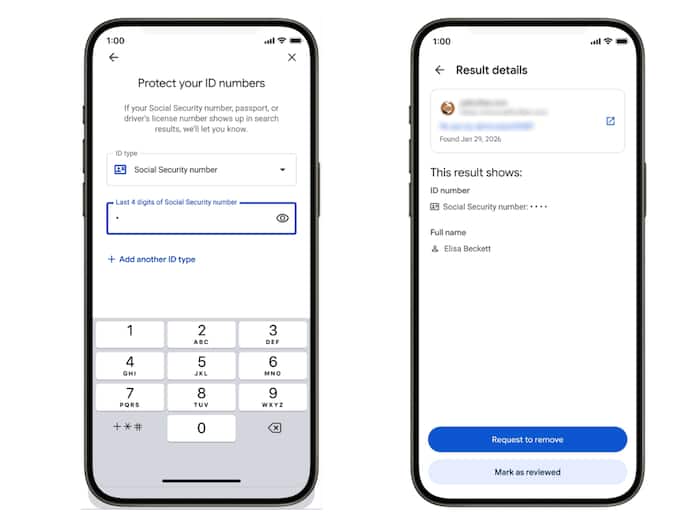
Google is expanding its “Results about you” tool to cover more categories of personal data. Earlier, the feature allowed you to remove contact details such as phone numbers, home addresses, and email IDs. Now, it goes a step further. You can request the removal of details like:
One of the key updates focuses on non-consensual explicit images, including AI-generated deepfakes.
However, you must note that these removals apply only to Google Search results. The original content will still exist on the website where it was published unless that platform deletes it separately.
The updated privacy tools are rolling out gradually, starting with the US and are expected to expand to other regions, including India.


Don't Miss Out the Latest Updates. Subscribe to Our Newsletter Today!
