


Written By Pranav Sawant
Published By: Pranav Sawant | Published: Apr 19, 2024, 08:33 PM (IST)


Written By Pranav Sawant
Meta began testing its AI chatbot dubbed Meta AI earlier this month. The feature was spotted on two of its popular apps, Instagram and WhatsApp. Last week, it rolled out the feature to Indian users in varying phases. Now, most users in the country can access it. Meta AI is more than just an AI chatbot, it’s also a generative AI tool. This means users can generate images in seconds using the tool. In this article, we will show you exactly how you can create visual Images in less than 10 seconds.  Also Read: How to protect your WhatsApp privacy and avoid scams
Those who still don’t know how to access the Meta AI chatbot can follow the steps below. After you get access to the AI tool, we will see how you can generate AI images. Also Read: Is Mark Zuckerberg building an AI version of himself to run Meta?
Step 1: Open WhatsApp on your Android or iOS smartphone.
Step 2: Check if you see a circular ring on the home screen of the app. On iOS it’s at the top before the blue-coloured ‘+’ button, whereas, on Android, it is above the green-coloured ‘+’ button. If you see it then you already have access to it (which means you can directly follow the next tutorial), if not, follow the next step.
Step 3: Close WhatsApp and Open the Google Play Store.
Step 4: Search for WhatsApp, and once it shows in the results, check if there’s any update. If there is any update, tap on Update to install it. Open the app after installing the update.
Step 5: Now, you should see the Meta AI button on the home screen of the app on the aforesaid location. Tap on it. You can now use it to ask queries. Let’s see how you can use it to generate new images.
Step 1: Open the Meta AI chatbot on WhatsApp.
Step 2: Use “/imagine”, to activate the generative mode.
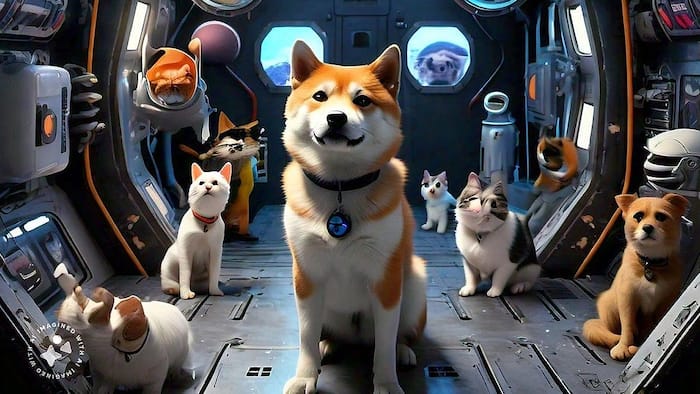
Step 3: Now, enter the prompt. For instance – Cats and dogs in a space rocket to Mars.
Step 4: Once you enter the prompt, tap on the send button that looks like an arrow. In less than a few seconds, the AI image should be ready. You can refer to the image we created above.

That’s how easily you can generate AI images on WhatsApp using Meta AI in less than 10 seconds.

Don't Miss Out the Latest Updates. Subscribe to Our Newsletter Today!
