


Written By Shubham Verma
Published By: Shubham Verma | Published: Mar 31, 2023, 08:34 PM (IST)


Written By Shubham Verma
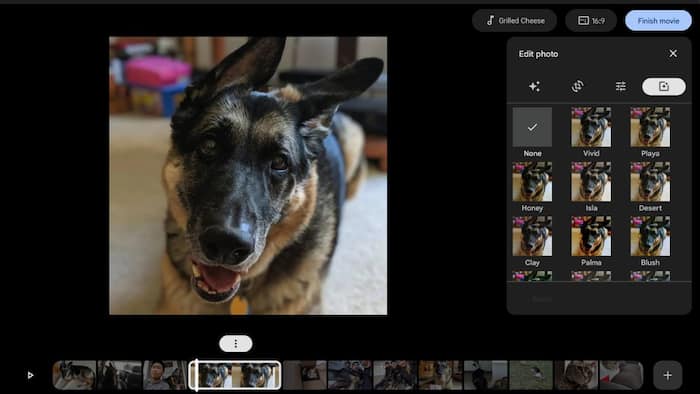
Tech giant Google has announced that it has started to roll out new video editing features in its photo sharing and storage service Google Photos on Chromebook. It is not an advanced movie editor by any means, but if you are looking to make a few simple edits to a video, it should be fun to work with.  Also Read: Aluminium OS: Google may merge Android and ChromeOS into one desktop platform
“Google Photos integrates with Chromebook’s Gallery and Files apps, so you can seamlessly use images and videos from your Chromebook and edit in Google Photos,” the tech giant said on a support page on Thursday. Also Read: How to edit images with Google Photos using text or voice prompts
The revamped movie creation tools allow users to create their own movies from scratch or from suggested themes. To make a movie, users have to search “movie” on their ChromeOS launcher, and they will find the shortcut to the Photos application. You can alternatively open the app manually through navigation. Also Read: Gmail update for iPhone makes sharing Google Photos easier: Here’s how
With suggested themes, users can easily create high-quality movies. There will be several templates to choose from, tapping on one of which will let you automatically adjust photos and videos for your movie. With Google’s algorithm, certain important moments from your videos will be automatically selected to make longer videos short.
“Select the theme and the people (or pets!) you’d like included and Google Photos will use both video clips and photos to create a custom movie,” the company said. “It even intelligently selects the most meaningful moments from your long videos,” it added.
The new movie editor in the Photos app on Chromebook is a nifty way to edit videos and make movies out of them. It is useful for your college year’s farewell video or a surprise video of greetings for a family member. But if you are expecting more advanced tools that offer more granular control over videos, you must look for better options, some of which are still not available on ChromeOS.

— Written with inputs from IANS

Don't Miss Out the Latest Updates. Subscribe to Our Newsletter Today!
