



Written By Shubham Arora
Published By: Shubham Arora | Published: Apr 02, 2026, 04:21 PM (IST)
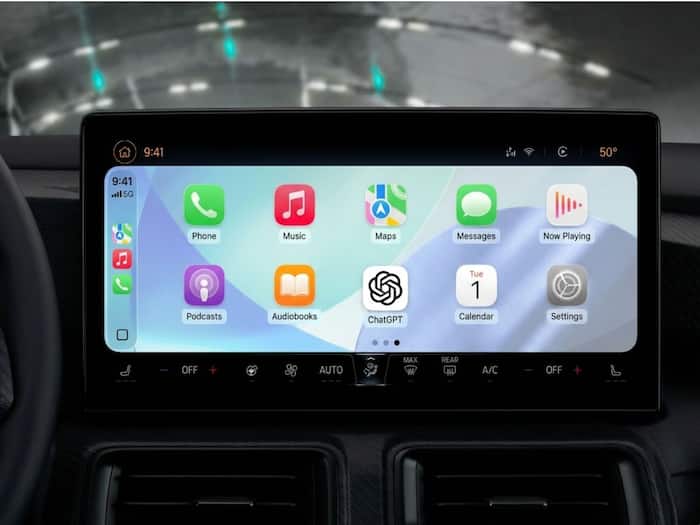
 ChatGPT now runs on Apple CarPlay with voice-based interaction while driving.


Written By Shubham Arora
ChatGPT is now available on Apple CarPlay, which gives you another way to use the AI while you’re driving. This comes after Apple allowed third-party voice-based apps with a recent iOS update. So now, instead of picking up your phone, you can just use ChatGPT straight from your car’s dashboard. The feature works on iPhones running iOS 26.4 or newer, along with the latest version of the app.  Also Read: iPhone Air price drops to Rs 90,990 with this Amazon deal; NO exchange deal needed
The experience is slightly different from what you see on your phone. On CarPlay, ChatGPT works only through voice. You ask a question, and it responds back in audio. Also Read: Apple security alert iOS 18.7.7: Urgent update released to fix dangerous spyware threat
There are no text replies or visuals on the screen. This has been done to keep things simple and avoid distractions while driving. You also get a couple of basic controls, like options to mute the conversation or end it.
Another thing to keep in mind is that there is no wake word support right now. To start using it, you’ll need to tap on the ChatGPT icon on the CarPlay screen.
You can use ChatGPT to ask general questions, get quick information, or even draft responses while driving. Since everything is voice-based, it fits into hands-free usage fairly well.
At the same time, there are some limitations. The app does not control your car’s functions or your iPhone settings. It also does not show detailed responses on screen, so everything depends on voice interaction.
Getting started is fairly simple if your device supports it.

This is one of the first times a major AI app has been added to CarPlay. It also shows that in-car systems are slowly moving beyond just navigation and music, with more features being added over time.

Don't Miss Out the Latest Updates. Subscribe to Our Newsletter Today!
