



Written By Shubham Arora
Published By: Shubham Arora | Published: Apr 02, 2026, 06:16 PM (IST)
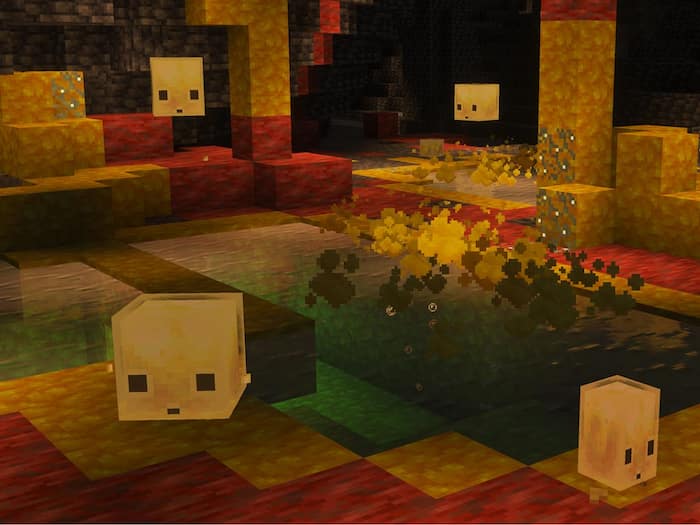
 Minecraft Bedrock 26.20.23/24 beta preview update brings new features.


Written By Shubham Arora
Minecraft Bedrock 26.20.23/24 beta and preview is now out, and it gives players an early look at a few changes that are expected to show up properly in later updates. The update started rolling out on March 31, and like previous preview builds, this one is mainly for testing new features before they reach the main version.  Also Read: Minecraft 26.1 Snapshot 5 makes baby mobs look different, adds a new item
The current build adds things like Sulfur Cave and Sulfur Cube, along with some fixes to existing issues. Since this is still a beta, you might come across bugs while playing, which is pretty normal for these releases. Also Read: Minecraft Rolls Out Its Final Update Of 2025 With New Mounts, Weapon, And Gameplay Tweaks
This isn’t a full update as such, it’s more of a testing version. It includes a few new elements that are likely part of upcoming content drops. You also get some performance fixes and small improvements in how the game runs. Also Read: Minecraft Down? Thousands Of Users Faced Issues With Login And Server Connections
That’s usually how these beta and preview builds work. Players get early access, and developers get feedback before pushing everything to the stable version.
If you are on Windows, open the Minecraft Launcher and select Bedrock Edition. Next to the Play button, you will see an option that lets you switch versions. From there, choose “Latest Preview.”
Once you select it, the launcher will start downloading the preview build. If you already had a previous version installed, you may just see an update instead of a fresh download.
On Xbox, go to the Game Store or your Game Pass library and search for “Minecraft Preview.” Once it shows up, install it like any other title.
On PlayStation, just open Minecraft from your library and head to the side menu where the Preview option shows up. Tap on it and you’ll get the option to download the preview version.
While it’s downloading, try not to switch networks or turn off your internet in between. That’s when installs usually get stuck.
If you’re on Android, open the Play Store, search for Minecraft, and scroll down till you see the option to join the beta. Once you join, the update will start downloading.
On iOS, it works through TestFlight. You need to sign up using the preview link and wait for access. Slots are limited, so sometimes you may not get in right away.

Since this is a test version, you may come across a few bugs or minor performance issues, depending on your phone. Also, once you install the beta, it replaces your current version of the game. So if you have worlds saved that you don’t want to lose, it’s better to back them up beforehand.

Don't Miss Out the Latest Updates. Subscribe to Our Newsletter Today!
