



Written By Shubham Arora
Published By: Shubham Arora | Published: May 23, 2026, 10:48 AM (IST)
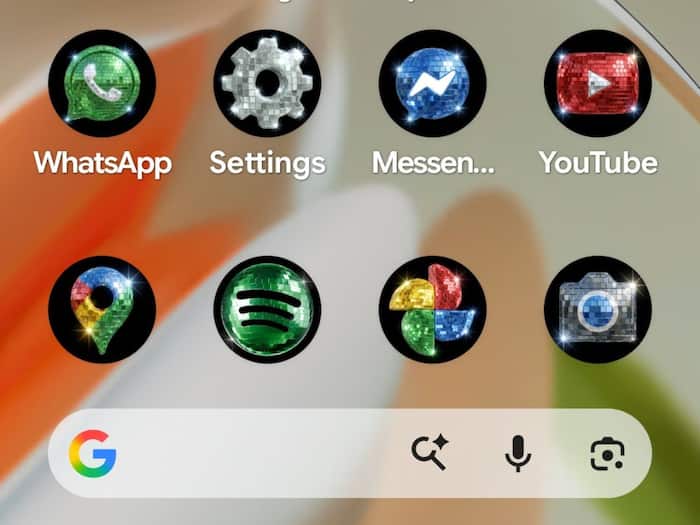
 Google’s new disco-style app icons are now available on supported Pixel phones. (Image credits: @ssamat/ X)


Written By Shubham Arora
Google has joined the ongoing disco icon trend by rolling out glitter-inspired app icons for Pixel phones. The new look comes shortly after Spotify received attention online for temporarily changing its app icon into a disco-ball design during its anniversary celebrations.  Also Read: 8 HIDDEN features inside Gmail that you must try now
Now, Google has taken the idea further by bringing a full set of shiny disco-style icons to Android users through Pixel customisation features. Also Read: Google's first Gemini-powered Home Speaker is here, and it's designed to talk more like a human
The new icon style was confirmed by Android ecosystem president Sameer Samat through a post on X, where he shared screenshots of a Pixel home screen filled with sparkling app icons.
Your wish is our command. Disco icons available on Pixel as of today.
… Are y'all sure you still want this ?? 😅@DurvidImel @RaceJohnson https://t.co/S9dwLZRtHl pic.twitter.com/nvevL7fTSb
— Sameer Samat (@ssamat) May 22, 2026
The icons are currently available through the Pixel Launcher’s custom icon feature. Instead of downloading a separate icon pack, users can apply the disco look directly from the built-in icon customisation settings available on supported Pixel devices.
The rollout is part of Google’s newer icon styling system that was introduced through recent Pixel updates. Earlier, users mainly had the option to match icon colours with wallpapers and themes. Now, Google is adding more visual styles that completely change the look of app icons.
Google introduced several new icon themes earlier through Pixel feature updates. These included styles like “Scribbles,” “Treasure,” and “Easel,” which changed app icons into hand-drawn or painted versions.
The disco theme follows a similar approach, but this time everything gets a reflective glitter-ball appearance. App icons like Chrome, Gmail, Maps, and YouTube now appear covered in silver sparkle textures.
The trend reportedly started after designers and Android users began sharing unofficial disco-style icon concepts online. Google later turned the idea into an official Pixel customisation option.
Like Spotify’s disco icon earlier, Google’s new look has also received mixed reactions online. Some users are calling it fun and different, while others feel the icons look messy or difficult to identify quickly.
A few users on X joked that the home screen now looks like a nightclub, while others surprisingly said they actually liked the over-the-top design. Some even started sharing customised Pixel home screens entirely themed around the disco look.

At the same time, a section of users pointed out that the feature is optional, so people who do not like the glitter-heavy icons can simply switch back to the regular themes. The disco icon style is currently available on supported Pixel devices using Google’s latest launcher customisation tools.

Don't Miss Out the Latest Updates. Subscribe to Our Newsletter Today!
