



Written By Shubham Arora
Published By: Shubham Arora | Published: Apr 16, 2026, 08:32 PM (IST)
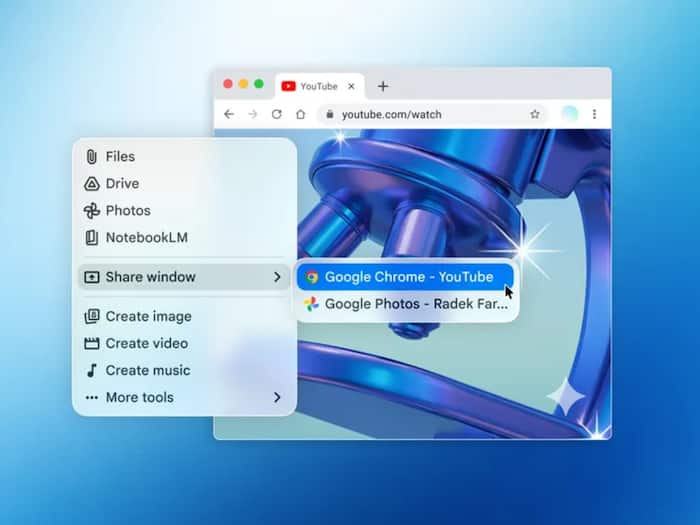
 Google Gemini AI app now available on Mac.


Written By Shubham Arora
Google has started rolling out its Gemini app for Mac users, bringing its AI assistant out of the browser and onto the desktop. Until now, most people were using Gemini through a web tab, but this new app changes how quickly you can access it while working.  Also Read: Wear OS 7 announced with live updates, better battery and new widgets: Know what Google announced
Instead of switching tabs every time, you can just pull up Gemini on your screen and keep working as usual. Also Read: What is Google Universal Cart? Explained in 5 points
The biggest change with the Mac app is how you access it. You can press a keyboard shortcut, Option + Space, and a small floating window will appear. From there, you can start chatting with Gemini instantly. Also Read: Google launches AI Ultra subscription with 20TB storage: Pricing, features explained
There is also support for sharing what’s on your screen. Once you allow permissions, Gemini can look at the content in your current window and respond based on that. This works well when you’re in the middle of something, like editing a document or reading a page, and just need a quick answer without jumping between tabs.
The app also supports file uploads. You can add documents, images, or files from your system or Google Drive and ask Gemini to work on them. Features like generating images, text, or even basic media are also part of the experience, similar to how Gemini works on mobile and web.
With this move, Google is clearly pushing Gemini as a desktop tool, not just a web-based assistant. Other AI tools like ChatGPT and Claude already have dedicated desktop apps, so this was expected.
At the same time, some competing apps can go a bit further and perform actions directly on your system. Gemini, for now, is more about giving you quick help based on what’s on your screen, rather than handling those deeper tasks.
The app is free and works on Macs running macOS Sequoia (version 15 or later).
To install it, just head to the official Gemini page (https://gemini.google/mac/) and follow the usual steps. Once it’s done, sign in with your Google account and you can start using it right away. After that, you can use the shortcut anytime to open Gemini and start using it without leaving what you’re doing.

More features are likely to come later, as Google continues to build on Gemini and expand what it can do over time.

Don't Miss Out the Latest Updates. Subscribe to Our Newsletter Today!
