BenQ Ideacam S1 Pro Review: Macro Mode On A Webcam!
But who should buy one?
Published By: Manik Berry
Published: Dec 30, 2023, 02:30 PM (IST)
Highlights
- The BenQ Ideacam S1 Pro is priced at Rs. 18,990.
- It comes with a control puck, a high quality mount, and a macro lens that connects magnetically.
- The key features include a macro mode, and a handheld mode for easy use.
You can flaunt your 18-inch gaming laptop all you want for the specs, but open the webcam for a minute and your Aadhaar card picture suddenly starts looking better than what you see on your monitor. And if you rely on your laptop webcam for professional quality video calls and demos, then it is bound to let you down sooner or later. Coming to external webcams is a different story too, since many either have shoddy build, or no proper backend to make the full use of their capabilities.
Enter, the BenQ Ideacam S1 Pro. While this is quite an expensive option, you get a high-quality webcam, along with some fancy controls to make full use of the camera. I used this camera for nearly 2 weeks, and this is a quick BenQ Ideacam S1 Pro review.
BenQ Ideacam S1 box contents
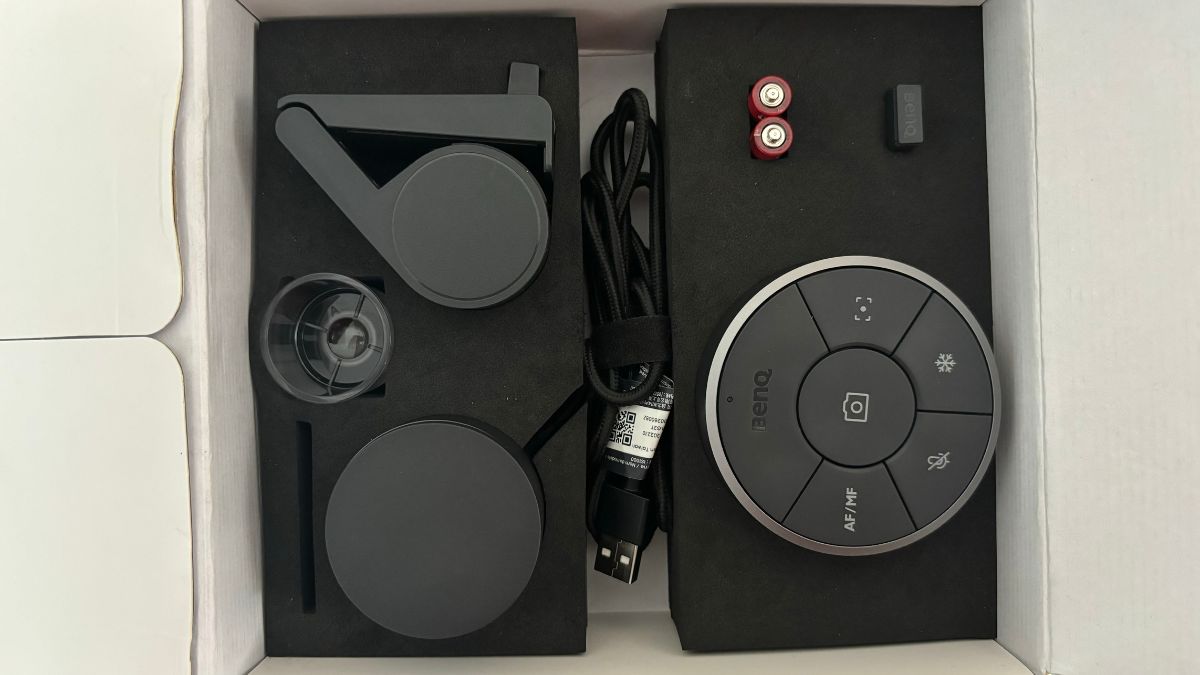
The box of the BenQ Ideacam S1 is simple, neat, and premium. When you open it, you'll find the webcam with its magnetic cover. Then you'll find the mount and macro lens next to the camera. On the other side of the box, you get the Enspire control puck, with 2 AA batteries and a USB-A dongle to plug it in your PC. The camera has a braided cable, and BenQ has used magnets to make everything easily snap together.
For instance, the camera's protective cover and 15x macro mount both connect to the unit magnetically. The control puck's bottom also connects using magnets, which is convenient to open and shut. The mount is also really heavy and high quality. You can lock it into place just by putting it on top of your monitor. The mount also has a cold-shoe attachment so you can setup the webcam on a tripod. However, there's no way to connect this on top of your laptop. It would've been better if BenQ included a separate mount to help set up the webcam on your PC.
BenQ Ideacam S1 Pro Specifications
| Specifications | BenQ Ideacam S1 Pro |
|---|---|
| Camera Resolution | Sony 8MP CMOS |
| Max Photo Resolution | 3264x2448 |
| Max Video Resolution | 3264x1836 @ 30fps 16:9 Aspect Ratio |
| Microphones | Digital microphone with built-in noise reduction |
| Ring Light | 6 LEDs ring |
| Connectivity | USB-A |
| Dimensions and weight | 107 x 83.5 x 57 (mm) 307g |
| Accessories | 1x Enspire Control puck 1x Macro lens with 15x magnification |
| Price | 18,990.00 |
BenQ Ideacam S1 Pro camera quality

Before we dive into features, let's get to the heart of the matter, the camera quality. The BenQ Ideacam S1 Pro uses an 8MP Sony CMOS sensor. This camera can give you up to 4k resolution videos at 30 fps. Those are decent specs on paper and translate to equally decent camera quality in real-world testing as well. Given enough light, the BenQ Ideacam S1 can capture fairly detailed images for presentation and streaming purposes.
While it isn't even close to replacing a phone camera, this has enough features and connectivity options to be a good option for users who want a high-quality webcam.
Ideacam S1 Pro features
Software
Finally, let's talk about the most exciting feature of this webcam, the macro mode. Once you start using it, you'll just want to capture more and more items with it. The magnetic macro attachment + webcam's ring light and handy mode give you the perfect set up to show anything you want in full detail. From the text written on a pen to the texture of leather and everything else. BenQ also added ruler options that are pretty accurate when paired with macro mode.
So if your work involves presenting or clicking items in macro mode, then this could be a useful feature for you. And for those who don't want to use it professionally, it is still plenty of fun when used as it is. However, this mode also has its own set of limitations. For instance, the macro won't really work that well without the integrated ring light. But turning on the ring light leaves stray streaks around, which means you can't take high-quality, natural-looking macros, but it is still good enough for demos.
BenQ Ideacam S1 Pro review: Verdict
I started the title with the word steroids, but I guess it is slightly more complicated than that. BenQ took the time to think this through, and it shows. The webcam itself is light and has a freeze frame button and a ring light on it. The macro lens snaps magnetically and the camera automatically recognizes and switches to macro focusing. BenQ's Enspire puck is also thoughtfully designed for professional use. The mount and overall hardware quality is really solid. However, there are some issues that BenQ needs to address.
One of the biggest limitations is the price. The BenQ Ideacam S1 Pro is priced at Rs. 18,990. At nearly Rs. 20,000, the Ideacam is asking a lot even with all the features it is packing. So if the company were to price it better, the Ideacam would be a no-brainer to recommend. However, at this price, streamers and professionals who need the demo mode, macro mode, and want a high-quality webcam are the people who can make full use of this camera.
Get latest Tech and Auto news from Techlusive on our WhatsApp Channel, Facebook, X (Twitter), Instagram and YouTube.