New Windows 11 update lets you link your iPhone to your PC using Phone Link for iOS
Microsoft is finally allowing iPhone users to link their devices to Windows 11 PC. This allows them to see messages, calls, and phone notifications.
Published By: Pranav Sawant
Published: Mar 01, 2023, 08:10 AM (IST)
Highlights
- Windows 11 will finally allow iPhone users to link their devices to their PCs using Phone Link for iOS.
- Phone Link for iOS will come as an early preview on the Windows Insider program.
- Phone Link for iOS will let you see calls, messages, and iPhone notifications on your PC.
Microsoft on Tuesday announced a big update for Windows 11. The operating system is getting a bunch of features and improvements such as the updated snipping tool, new AI-powered Bing, changes to widgets, and more.
In addition to these features, Microsoft also announced Phone Link for iOS. The feature lets iOS users finally connect their iPhones to Windows 11 PC. It will then help them do a couple of things directly on their PC including seeing messages, calls, and more.
Phone Link for iOS lets you link your iPhone to Windows 11 PC
For the uninitiated, Phone Link is an app that lets users link their phones to their PCs. However, this feature was limited to Android smartphones, so far. Now, finally, the feature is arriving for iPhones.
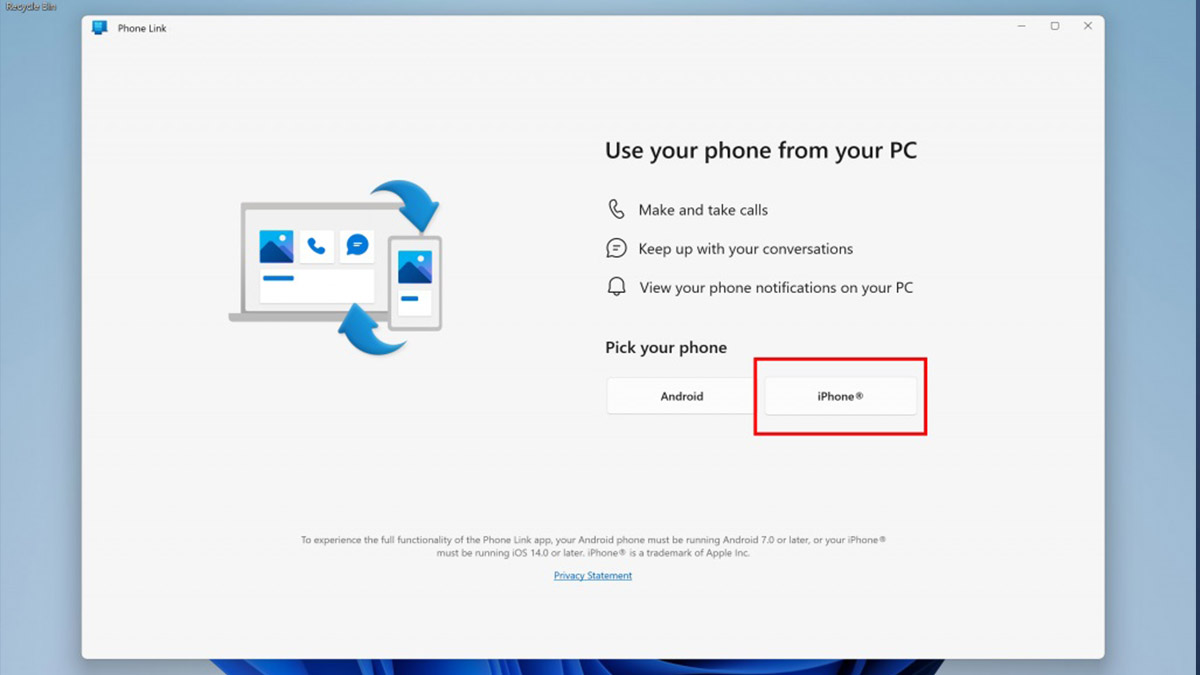
Similar to how it works on Android, it will let iOS users link their iPhones to Windows PC and then allow them to see the most important details directly on their PC. This includes calls, messages, and phone notifications.
Having said that, you can use iMessage directly from your Windows 11 PC. Also, you'll be able to make and take calls on your PC.
While Microsoft has announced the feature, it isn't available directly for Windows 11 users. The early preview of the feature will come on Windows 11 with Windows Insider.
So those who have signed up for the Windows Insider program will be able to use the feature (for now). Even for Insiders, only a small percentage of them will get the feature.
To check if the feature is available, you can open the Phone Link app on your Windows 11 PC. Unlike before, the app will now also show iPhone as an option for linking. Then with the help of Bluetooth, the iPhone can be linked to your Windows 11 PC.
Similar to the interface for Android, iOS users will be able to see their iPhone's name and battery percentage in the upper left corner. The Phone Link app will make three tabs Notifications, Messages/Calls, and a tab to see the activities of messages.
Get latest Tech and Auto news from Techlusive on our WhatsApp Channel, Facebook, X (Twitter), Instagram and YouTube.