iPhone 17 Pro Max hidden features: 3 secret tools Apple doesn’t tell you about
Many iPhone 17 users miss out on useful features that can make everyday tasks easier. From setting timers based on exact time to creating reminders that are hard to ignore and navigating settings faster, these hidden tools can improve how you use your phone.
Published By: Deepti Ratnam | Published: May 05, 2026, 10:53 AM (IST) | Edited: May 05, 2026, 11:04 AM (IST)
iPhone has some of the most useful features that are often missed by users. These features are hidden inside settings and a lot of people forget about them with time. They are not heavily promoted by Apple, but they play an important role in managing our day to day activities like missing reminders, managing time, and navigating settings.
In this article, we will delve into such useful iPhone features that are easy to use once you know where to find them.
Check Out Hidden iPhone Features You Didn't Know Existed
You Can Set Timer Based on Exact Time
Yes, you heard that right! Most people use timers by entering minutes or hours. This often leads to confusion when working with deadlines. You need to calculate how much time is left and it can result into breaking your focus and lead to mistakes.
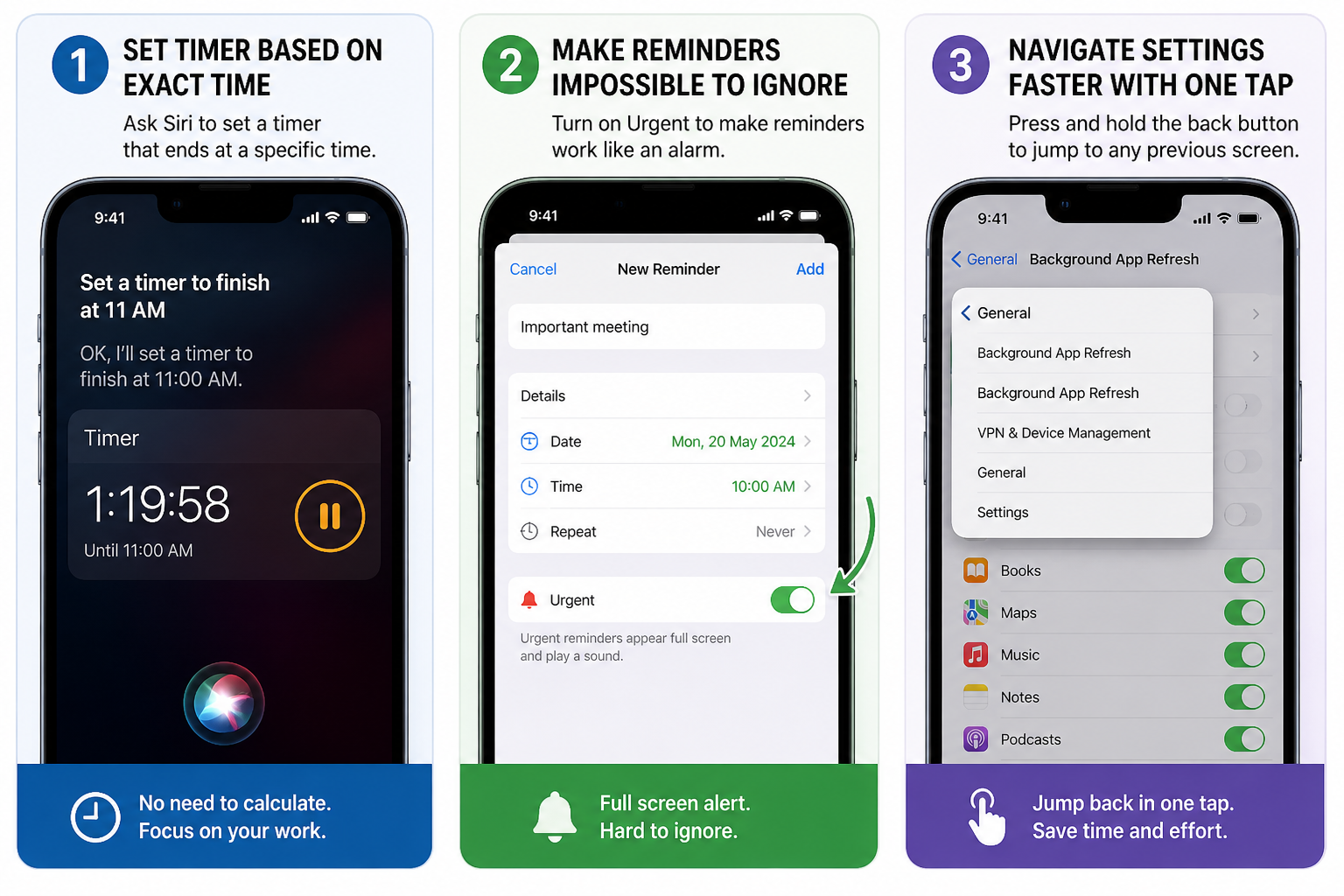
Nevertheless, there is a simpler way through which you can set a timer that ends at a specific time. You can ask Siri to create a timer that runs until a chosen time. For example, 'You can say set a timer to finish at 11 AM.' Your iPhone will automatically calculate the remaining time and start the countdown.
The feature is extremely useful during working hours, cooking, and meetings. It not only removes the need for manual calculation, but it also helps you stay focused. The timer will show you how much time is left until your target time. This makes your tasks easier to manage.
Here's How You Can Make Reminders Impossible To Ignore
One of the another interesting and hidden features in our iPhone is a Reminder app, which is helpful, but many users ignore its notifications. You can easily dismissed regular alerts and many a times you often forgot your important tasks. This is where a hidden option allows you to mark reminders as urgent.
Once you enable this feature, the reminder will work like an alarm rather than a simple notification. It will start appearing on your full screen and plays a sound, making it hard to ignore.
You can easily use this by opening the Reminders app on your iPhone device and create a new reminder. Once you set the date and time, open the details section. Now, turn on the urgent option. As soon as it is activated, the reminder will alert you strongly at the scheduled time.
This is an interesting as well as useful feature for tasks that cannot be missed like meetings, deadlines, and important calls.
Faster iPhone Navigation with One Tap
Many times we find that our settings app is becoming confusing when we go deep into multiple menus. Normally, you have to tap the back button several times to return to the main screen.
It has a quicker way. The back button on the top left can be pressed and held. You will see a list displaying the route you took. Based on this list, you could simply click on any past screen.
This saves time and simplifies the navigation process. It is also of great use when modifying advanced settings, or when going through various options. Rather than having to tap back and back again, you can do it in a single step.
Why These Features Matter and Their Importance in Our Daily Lives
These features can be viewed as small, though they benefit daily use. They save time, decrease effort, and assist to prevent errors. Most users are only concerned with new updates and overlook these useful tools.
Such features are often hidden inside settings. But once you start using it, they can be incorporated into your everyday life.
iPhones have numerous handy functions which are not easy to find. The actual difference can be created with the help of such tools as time-based timers, urgent reminders, and quick navigation. They are easy but they will resolve actual issues. Knowing these features can make you more effective in using your device without having to install any additional app
Get latest Tech and Auto news from Techlusive on our WhatsApp Channel, Facebook, X (Twitter), Instagram and YouTube.